
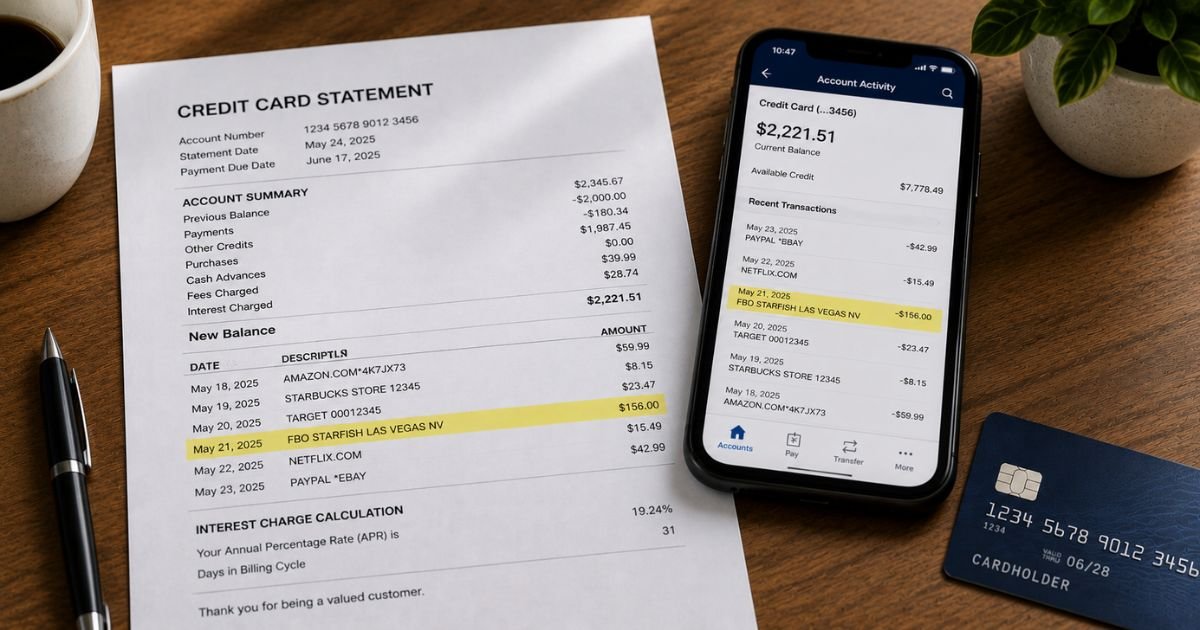
You check your bank or credit card statement and see a charge labeled “FBO Starfish,” “FBU STARFISH,” “FBO Starfish Las Vegas NV,” or a similar variation. The name may not look familiar, and the amount can range from small purchases to larger deposits.
This guide explains what the FBO Starfish charge on bank statement means, common reasons it appears, how to confirm it, and the practical steps to cancel or dispute it if the charge is unwanted or unrecognized.
Table of Contents
What Is the FBO Starfish Charge?
FBO Starfish (sometimes shown as FBU STARFISH or with “Las Vegas NV”) is a merchant billing descriptor that appears on credit card and bank statements.
- FBO commonly stands for “For Benefit Of.” Payment processors use this when handling funds on behalf of another company.
- Starfish refers to the platform or game developer associated with the charge.
- Many statements also include a Las Vegas, Nevada location.
Consumer reports and charge-identification sources consistently link this descriptor to online social casino games, sweepstakes-style apps, or real-money/prize gaming platforms (including Mahjong-style cash games and similar apps).
One frequently mentioned related site is Starfishfun.com or comparable gaming platforms.
These are typically in-app purchases, virtual currency deposits, or entry fees for games that offer prizes or cash rewards.
Why Did This Charge Appear?
Common reasons include:
- You (or someone using your card) made an in-app purchase or deposit in a social casino or sweepstakes gaming app.
- A free trial or promotional offer converted to a paid deposit.
- Recurring or repeated small purchases inside a game.
- A family member or household member used the payment method for gaming.
- The charge was processed through a payment intermediary that uses the “FBO Starfish” descriptor.
These charges often appear in varying amounts (commonly $20, $50, $100, or similar) depending on the deposits or purchases made inside the app.
How to Verify the Charge
Follow this checklist:
- Note the exact date, amount, and full descriptor from your statement (including any city or state).
- Search your email for receipts or confirmations from gaming apps around that date.
- Check the purchase history or transaction logs inside any social casino, sweepstakes, or mobile gaming apps linked to the card.
- Review app store accounts (Apple, Google Play, etc.) for related subscriptions or in-app purchases.
- Ask anyone who has access to the card whether they used a gaming app.
- If a website or app name appears in related emails, log in and review the account activity.
Matching the amount and date to a gaming deposit or purchase usually confirms the source.
Is It Legitimate or Fraud?
Common legitimate scenarios
- Intentional deposits or purchases inside a social casino or sweepstakes app
- In-app microtransactions you authorized
- Charges made by a household member with access to the card
Warning signs
- You have never used any online gaming or sweepstakes apps
- Multiple charges appear in a short period without your knowledge
- You cannot find any matching app or email confirmation
- The charges continue after you believe you stopped playing
The descriptor itself is associated with real gaming platforms. However, if you did not authorize the activity, treat it as unauthorized and act quickly.
How to Cancel
- Identify the specific app or website linked to the charge (check emails and app purchase history).
- Open the app or website and look for account, billing, or subscription settings.
- Cancel any recurring deposits, auto-reloads, or memberships.
- Remove the saved payment method from the app.
- Uninstall the app if you no longer want access.
- If you cannot locate the account, contact the platform’s support (if available) or your bank for help identifying the merchant.
Stopping the payment method inside the app is usually the most effective way to prevent future charges.
Can You Get a Refund?
Refund success varies:
- Contact the gaming platform or app support directly and request a refund for recent deposits if the purchases were accidental or unauthorized.
- Many social casino and sweepstakes apps have limited refund policies, especially after virtual currency is used.
- If the charge is unauthorized, report it to your bank or card issuer promptly. Credit cards generally offer stronger dispute rights (often within 60 days of the statement). Debit card reports should be made as soon as possible.
Keep screenshots of the statement, any app activity, and all communications.
What to Do If the Charge Is Unauthorized
- Review all recent activity on the card and any linked gaming apps.
- Remove the payment method from every app and website that used it.
- Call your bank or card issuer the same day and report the charge as unauthorized.
- Request a card freeze or replacement if needed.
- Change passwords on email and any accounts that may have been compromised.
- Monitor the account for additional charges and document every conversation with dates and reference numbers.
Prevention Tips
- Review bank and credit card statements at least weekly.
- Turn on real-time transaction alerts.
- Avoid saving debit or credit cards inside gaming or sweepstakes apps.
- Use a dedicated virtual card or secondary payment method for any online gaming.
- Set spending limits or remove payment methods after each session.
- Be cautious with free credits or promotional offers that require a card.
- Regularly check app-store purchase histories.
- Enable two-factor authentication on email and financial accounts.
Common Descriptor Variations
| Statement Appearance | Typical Association |
|---|---|
| FBO Starfish | Online gaming / sweepstakes deposit |
| FBU STARFISH Las Vegas NV | Same, with location shown |
| FBO Starfish + amount variations | In-app purchases or deposits |
Quick Action Guide
| Situation | First Step |
|---|---|
| Recognize a gaming app | Cancel inside the app and remove the card |
| Do not recognize the charge | Contact your bank the same day |
| Multiple ongoing charges | Freeze the card and dispute |
| Want a refund | Contact the platform + your bank |
FAQs: FBO Starfish Charge on Bank Statement
Q. What does FBO mean in FBO Starfish?
A. FBO usually stands for “For Benefit Of.” It indicates the payment was processed on behalf of the Starfish-related platform.
Q. Is this related to real-money gambling?
A. Consumer reports link it to social casino and sweepstakes-style apps that offer prizes or cash rewards. These operate in a gray area relative to traditional gambling regulations in some locations.
Q. Can I stop future FBO Starfish charges?
A. Yes. Remove the payment method from the related app or website, cancel any auto-reload features, and monitor your statements. Contact your bank if charges continue.
Q. What if I never downloaded any gaming apps?
A. Treat the charge as unauthorized. Report it to your bank immediately and request an investigation. Check whether someone else with access to the card made the purchases.
Conclusion
An FBO Starfish charge on bank statement is most commonly linked to online social casino, sweepstakes, or prize-based gaming apps, often processed through a Las Vegas-related entity. The “FBO” portion indicates the payment was handled for the benefit of that platform.
Verify the charge by checking app purchase histories and email receipts. If the activity was authorized, cancel inside the app to stop future billing.
If it was not, contact your bank right away to dispute the charge and protect your account.
Regular statement reviews and removing saved payment methods from gaming apps are the most effective ways to avoid unexpected charges.
Disclaimer: This article is for informational purposes only and is not financial or legal advice. Always confirm details directly with your bank or card issuer, as descriptors and merchant practices can change.
Meet the Author
