
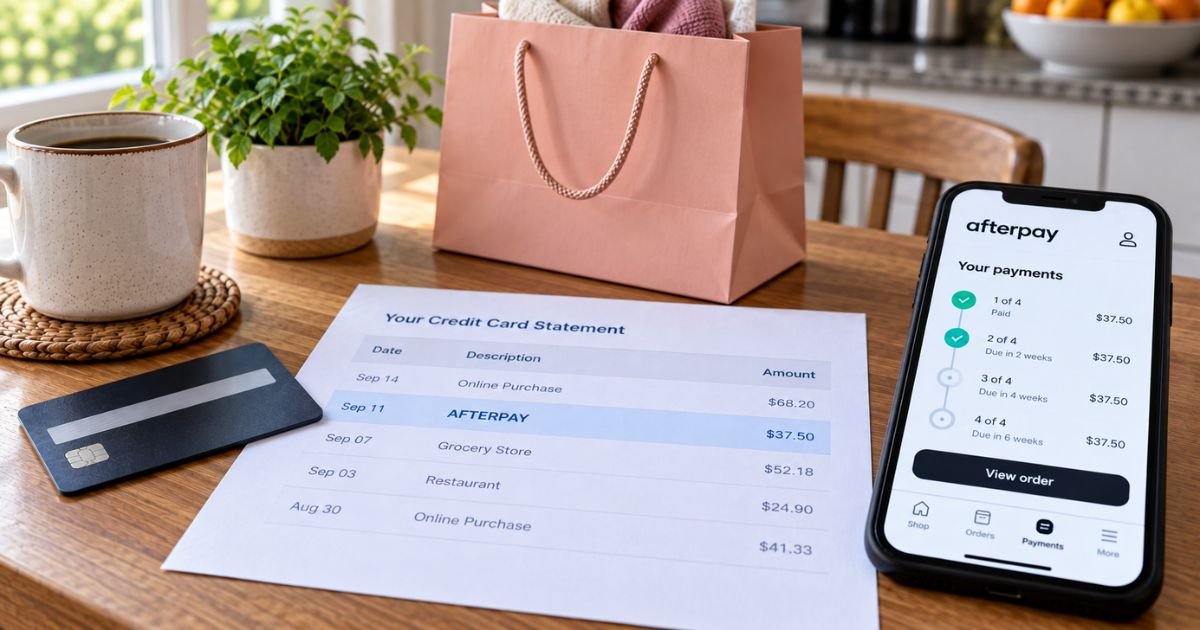
An Afterpay charge on a credit card can feel confusing if you don’t recall a store named Afterpay. You checked out at a retailer. The card says AFTERPAY instead.
Unfamiliar Afterpay lines are often legitimate installments. Afterpay is a real “buy now, pay later” service, now branded Cash App Afterpay in the U.S. under Block, Inc.
This guide explains what the charge is, how Pay in 4 bills your card, and how to match or stop the next pull.
Table of Contents
What is an Afterpay charge on a credit card?
An Afterpay charge on credit card is typically Afterpay collecting one piece of a purchase you made at another store. Afterpay pays the retailer. Then it bills you on a schedule. Your issuer prints AFTERPAY, not the shop on the website.
The main U.S. product is Pay in 4. Official U.S. help says Pay in 4 is free when you pay on time at partnered merchants. You generally pay 25% at purchase. The other three payments come every two weeks from the card or bank on file.
Pay Monthly is a longer plan for larger orders. Official U.S. card help says credit cards can be used for Pay in 4 only. Pay Monthly does not accept credit cards. It uses debit or other allowed methods. Pay Monthly can include interest. That rate is shown at checkout if you are offered that product.
Afterpay U.S. also lives inside Cash App for some shoppers. Official Cash App help says Afterpay started in Cash App stays in Cash App. Older Afterpay-app orders stay in the Afterpay app. Check both if you use both.
Official U.S. help accepts U.S.-issued Visa and Mastercard credit and debit cards, Cash App Card, and eligible U.S. checking accounts. Apple Pay, Google Pay, and Cash App Pay can work too. Foreign cards and other buy-now-pay-later cards are not accepted.
How the charge usually appears
Banks cut the store name. You see the processor.
| What you may see | What it often means |
|---|---|
| AFTERPAY | Standard installment or first payment |
| AFTERPAY plus a string of numbers | Same company, plus a bank or order reference |
| POS, CHECKCARD, or PREAUTHORIZED AFTERPAY | Your issuer’s label for how it processed the debit |
| PENDING AFTERPAY | Authorization that has not fully posted |
| Cash App Afterpay in the app, AFTERPAY on the card | Same service, different brand on each screen |
Four similar amounts two weeks apart usually mean one order, not four shops. A late-fee line can be smaller than an installment. Official U.S. help says shoppers may receive up to an $8 late fee per missed installment, and total late fees on an order will not exceed 25% of the order value.
The U.S. Installment Agreement says a late fee may apply if an installment stays unpaid for 10 days after the due date, up to $8.00, and never more than state law allows.
Retailer FAQ language matches that 10-day window and the 25% cap. Do not mix those U.S. figures with Afterpay’s Australian $10 and $7 schedule. That is a different country page.
Why the store name is missing
Afterpay is the merchant of record on the card network for the installment. The retailer already received its money from Afterpay. Your card only talks to Afterpay.
A one-time or in-app card for a non-partner store can still post as AFTERPAY. Official U.S. cost help says a finance fee may apply on non-partnered merchants for Single Use Payment or gift-card purchases made in the Afterpay app. That fee should be disclosed before you confirm.
Saved Afterpay at a merchant can start another Pay in 4 later. The U.S. Installment Agreement says linking Afterpay at a store can let that merchant request future Pay in 4 loans. Review stored checkouts if surprise orders keep appearing.
Pro Tip: Open the Afterpay app or afterpay.com, go to your orders, and match the date and amount. The in-app store name is the missing piece from the card line.
How to confirm it in your account
- Sign in at afterpay.com or in the official Afterpay app.
- If the purchase started in Cash App, open Cash App Afterpay there instead.
- Find the order with the same total or the same one-fourth amount.
- Read the remaining schedule and the card on file.
- Check email for Afterpay payment reminders.
Afterpay also emails a link to a monthly billing statement in the app. Official U.S. statement help says the statement date follows the day you opened the account. Statements in that help article are available from July 30, 2024 forward.
You can often pay early in the app. Paying the rest of a Pay in 4 order stops later automatic pulls on that order.
Official U.S. help says you can change some upcoming due dates, but not payments due in less than 24 hours, already overdue, or tied to travel.
Returns, refunds, and why billing continues
Contact the store first. Afterpay does not set the retailer’s return policy.
If the merchant refunds Afterpay, your remaining installments should fall as Afterpay applies the credit.
If the merchant refunds your card or gives store credit instead, official help says the Afterpay installments can still be due. The merchant paid you back outside Afterpay. Ask the store to process the refund through Afterpay.
Official U.S. billing-error help covers wrong amounts, goods not received as agreed, duplicates, missing refund credits, and unauthorized charges.
Afterpay says it can assist on orders up to 120 days old. Start in the app. Include the amount, date, and why the line is wrong.
How to stop future Afterpay card charges
There is no single “cancel Afterpay” button that ends every store relationship.
- Pay remaining Pay in 4 balances early.
- Remove or replace the credit card under payment methods.
- Turn off Afterpay as a saved checkout method at merchants you no longer use.
- Uninstalling the app does not stop scheduled pulls.
Official support will never ask for your password, PIN, full card number, or a “test” payment. Official U.S. contact is chat in the app under My Afterpay, then Support, 24/7. Phone is (833) 844-8095, listed daily 8:00 a.m. to 9:30 p.m. ET.
Common Mistakes: Treating a store refund to the card as a closed Afterpay plan. Missing the next three dates after you paid the first 25%. Calling a number from a text that is not (833) 844-8095.
Lookalikes that are not Afterpay
- Klarna, Affirm, Zip, Sezzle, or PayPal Pay in 4
- A Cash App P2P send that is not Afterpay
- The retailer charging your card directly
- Square POS lines that start with SQ * and a shop name
- Afterpay Australia or Clearpay UK pages, which use different late-fee math
Open afterpay.com yourself. Afterpay U.S. and Cash App Afterpay are the same Block family. They are still separate from Venmo.
If you did not authorize the charge
Change your Afterpay password and review devices and cards. Report the order in the app. Call official support if you cannot get in.
If the money left a credit card you control, you can also use your issuer’s billing-error process. Federal credit-card rules generally give you 60 days after the statement was sent to dispute in writing. Keep the Afterpay order screen and the store receipt.
Missed Pay in 4 payments can pause new Afterpay shopping until you catch up. That pause is not the same as a credit-card late fee from your issuer. Your card issuer can still add its own cash-advance or over-limit fees if it treats the pull that way. That treatment varies.
FAQs: Afterpay Charge on Credit Card
Q. Why does an Afterpay charge on a credit card hide the store?
A. Afterpay collects the installment, so the card network prints AFTERPAY. The retailer already got paid by Afterpay. Match the amount in the Afterpay or Cash App Afterpay order list to see the shop name.
Q. Will Afterpay keep billing every two weeks?
A. For Pay in 4, yes, until all four payments are collected or you pay the rest early. One successful first payment does not cancel the other three. Watch the schedule in the app. Pay Monthly follows a longer calendar and generally cannot use a credit card.
Q. How much is the U.S. late fee?
A. Official U.S. help says you may receive up to an $8 late fee per missed installment, and total late fees on that order will not exceed 25% of the order value. The U.S. Installment Agreement describes a 10-day wait after the due date before that fee. Your schedule in the app is the amount that applies to you.
Q. Can the store cancel Afterpay for me?
A. The store can cancel or refund the order. Afterpay then updates the plan if the refund runs through Afterpay. Official help says Afterpay cannot override a merchant refund that went straight to your card. Ask the store to refund Afterpay if installments are still pulling.
Conclusion
An Afterpay charge on a credit card is typically a Cash App Afterpay Pay in 4 installment, billed under the Afterpay name instead of the retailer. Pay on time and official U.S. pages say there is no interest at partner stores.
Confirm the order in the Afterpay or Cash App app, pay early if you want the pulls to stop, and use in-app chat or (833) 844-8095 if the line is not yours.
Disclaimer: This article is for general information only. It is not financial, legal, or tax advice. Afterpay fees, descriptors, products, and refund rules vary by country, plan, merchant, and issuer. Verify account-specific questions with Afterpay or your bank before you dispute or change a payment method.
Meet the Author
