
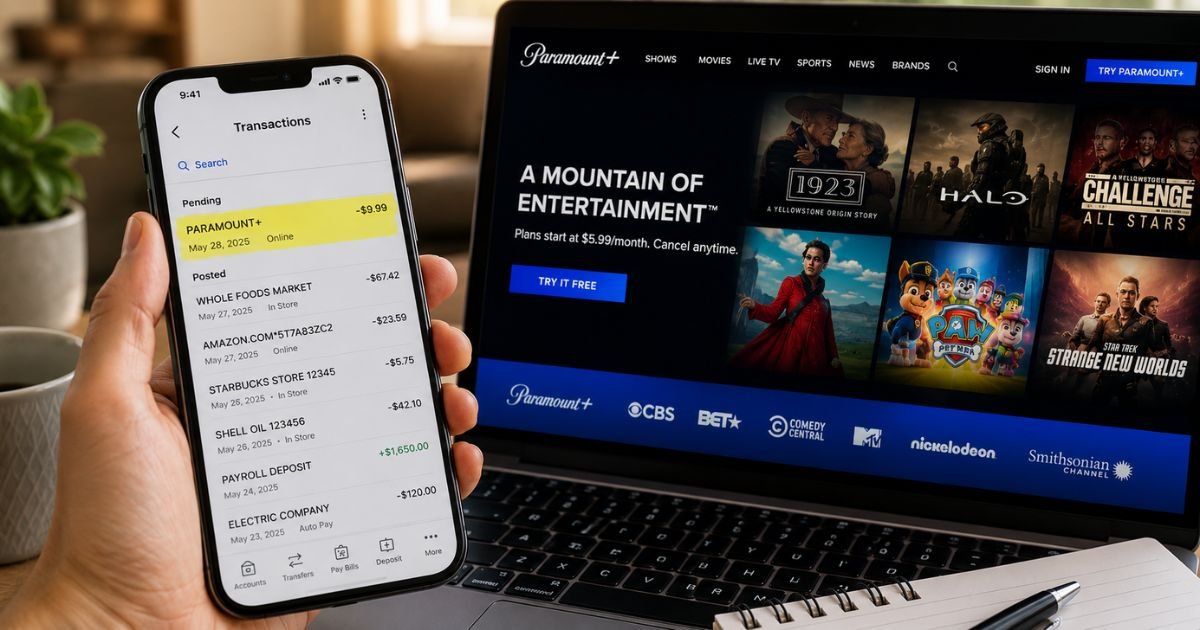
You open your bank or credit card statement and notice a charge labeled PARAMOUNT+, PARAMOUNT PLUS, or something close.
If you do not remember signing up, or thought you had canceled, the charge can feel confusing.
This guide shows you exactly how the Paramount Plus charge appears on statements, the common reasons it shows up, how to confirm it belongs to you, and the clear steps to cancel or get help if something looks wrong.
Table of Contents
What Is the Paramount Plus Charge?
Paramount+ is a streaming service owned by Paramount that offers movies, TV shows, live sports, news, and exclusive originals. It was formerly known as CBS All Access.
When Paramount+ bills you for a monthly or annual subscription, the charge appears under short billing descriptors that fit the limited space banks allow.
Common ways the charge looks on bank or credit card statements include:
- PARAMOUNT+
- PARAMOUNTPLUS
- PAR*Paramount Plus
- PARAMOUNT PLUS
- CBS*PARAMOUNT+ (especially for accounts that started as CBS All Access)
If you signed up through a third-party platform, the charge may appear under that company’s name instead:
- APPLE.COM/BILL
- GOOGLE*Paramount or similar Google Play descriptors
- AMAZON DIGITAL or AMZN* entries
- ROKU INC
The exact wording can vary slightly by bank and payment processor.
Why Did This Charge Appear?
Here are the most common reasons you see a Paramount Plus charge on bank statement:
- Your free trial ended and the paid plan started.
- Your monthly or annual subscription renewed automatically.
- You or a household member signed up using a shared payment method.
- You upgraded from Essential to Premium or added Showtime benefits.
- The charge came through a third-party store (Apple, Google, Amazon, or Roku) where you originally subscribed.
- A price increase took effect and the new rate posted.
As of 2026, U.S. plans are typically $8.99 per month (Essential, with ads) or $13.99 per month (Premium, mostly ad-free).
Annual plans cost less overall and post as one larger charge once a year.
How to Verify the Charge
Use this simple checklist:
- Note the exact date, amount, and full descriptor from your statement.
- Sign in to your Paramount+ account at paramountplus.com and check your membership and billing details.
- Look at Your Account or Subscription settings for the plan type and next billing date.
- Check email for confirmation messages from Paramount+ or the platform you used to subscribe.
- If the charge shows under Apple, Google, Amazon, or Roku, review subscriptions in that account as well.
- Ask anyone who shares your payment method whether they started or renewed a Paramount+ plan.
If the amount and date match an active subscription, the charge is almost certainly legitimate.
Is It Legitimate or Fraud?
Common legitimate scenarios
- Automatic renewal of an active plan
- End of a free trial
- Subscription managed through a third-party app store
- A family member using a shared card
Warning signs
- You have never created a Paramount+ account
- Multiple charges appear in a short period
- The amount is far higher than the known plan prices
- You already canceled and still see new charges weeks later
If anything feels off, first review your Paramount+ account and any linked third-party subscriptions. Then contact Paramount+ support through their official help center.
After that, reach out to your bank if the charge remains unexplained.
How to Cancel Subscription
Cancellation depends on how you originally signed up.
If you subscribed directly on paramountplus.com:
- Sign in to your account.
- Go to Account or Membership settings.
- Select the option to cancel or manage your subscription.
- Follow the prompts and confirm.
If you subscribed through Apple, Google, Amazon, or Roku:
Cancel inside that platform’s subscription management page. Paramount+ cannot cancel those for you.
You keep access until the end of the current paid period. Canceling stops future charges.
Can You Get a Refund?
Refund policies vary by how and when you cancel:
- Direct Paramount+ subscriptions may offer a refund in certain cases (for example, if benefits were not used).
- Third-party platform subscriptions (Apple, Google, etc.) follow that platform’s refund rules.
- Contact Paramount+ support or the platform support team with the transaction details.
If the charge is unauthorized, report it to both Paramount+ (or the billing platform) and your bank promptly.
Credit cards generally allow disputes within 60 days of the statement date. Debit cards often require faster reporting.
What to Do If the Charge Is Unauthorized
- Sign in to Paramount+ and any linked app-store accounts and review recent activity.
- Cancel any active subscriptions you do not recognize.
- Change your passwords and enable two-factor authentication where available.
- Contact Paramount+ support through the official help center and report the charge.
- Call your bank or card issuer the same day and open a dispute if needed.
- Keep notes of dates, amounts, and reference numbers from every conversation.
Acting quickly limits potential further charges and strengthens your dispute.
Prevention Tips
- Review bank and credit card statements at least weekly.
- Turn on real-time transaction alerts in your banking app.
- Keep a simple list of all active streaming subscriptions.
- Use a dedicated payment method for subscriptions when possible.
- Set a calendar reminder before known renewal dates.
- Regularly check the subscription management pages for Apple, Google, Amazon, and Roku.
- Remove unused payment methods from streaming accounts.
- Enable two-factor authentication on your Paramount+ and related accounts.
Common Paramount Plus Descriptor Variations
| Statement Appearance | What It Usually Means |
|---|---|
| PARAMOUNT+ or PARAMOUNTPLUS | Direct Paramount+ subscription |
| PAR*Paramount Plus | Shortened processor version |
| CBS*PARAMOUNT+ | Legacy CBS All Access account |
| APPLE.COM/BILL | Billed through Apple |
| GOOGLE* or similar | Billed through Google Play |
| AMAZON DIGITAL / AMZN* | Billed through Amazon |
| ROKU INC | Billed through Roku |
Typical Plan Prices (U.S., 2026)
| Plan | Monthly | Annual (approx.) |
|---|---|---|
| Essential (with ads) | $8.99 | $89.99 |
| Premium (ad-free) | $13.99 | $139.99 |
FAQs: What Does Paramount Plus Charge Look Like on Bank Statement
Q. Why does my Paramount Plus charge show under Apple or Google instead of Paramount?
A. You originally subscribed through that app store. The store handles billing, so the charge appears under their name. Cancel inside the same store.
Q. Can a family member’s Paramount+ charge appear on my card?
A. Yes. If they used a payment method saved on a shared account or device, the renewal can post to your card.
Q. How do I find my next billing date?
A. Sign in to your Paramount+ account and check the membership or billing section. Third-party subscriptions show the date inside Apple, Google, Amazon, or Roku subscription settings.
Q. What if I canceled but still see a new charge?
A. Confirm the cancellation was completed in the correct place (Paramount+ site or the original app store). Contact support with the transaction details if a charge posts after the confirmed end date.
Conclusion
A Paramount Plus charge on bank statement most often appears as PARAMOUNT+, PARAMOUNTPLUS, PAR*Paramount Plus, or under a third-party name such as APPLE.COM/BILL.
In the majority of cases it is a legitimate monthly or annual subscription renewal.
Verify it by checking your Paramount+ account and any linked app-store subscriptions. Cancel through the same place you signed up to stop future charges.
If the charge is truly unauthorized, contact Paramount+ support and your bank right away.
You now have the clear steps to identify, confirm, and handle the charge with confidence.
Disclaimer: This article is for informational purposes only and is not financial or legal advice. Always confirm details directly with Paramount+ and your bank or card issuer, as descriptors, prices, and policies can change.
Meet the Author
