
A 365 Market charge on credit card can feel confusing if you don’t recall signing up for anything. Unfamiliar charges like this are often legitimate one-time purchases from everyday spots.
This guide explains what the charge typically means, common places it comes from, how to check if it belongs to you, and the steps to take if something seems off.
Table of Contents
What Is the 365 Market Charge on Your Credit Card?
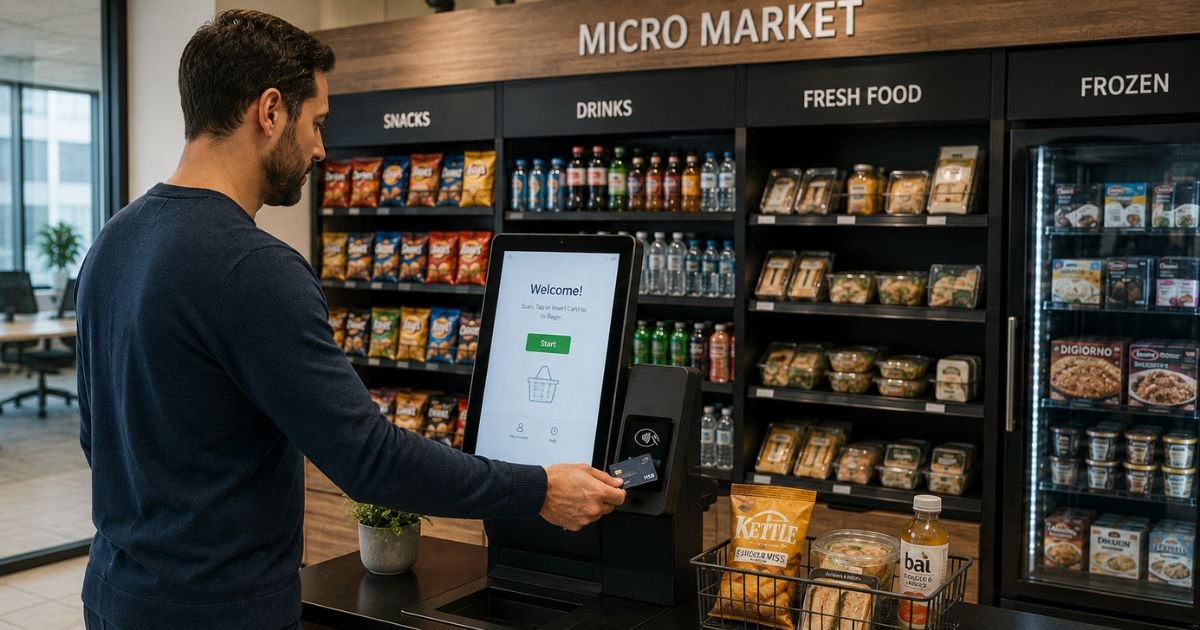
The 365 Market charge on your credit card is generally a payment processed through 365 Retail Markets. This company provides the self-service checkout technology used in many unattended retail setups.
You may have bought snacks, drinks, coffee, or a small meal at a kiosk or vending machine. The charge appears under the technology provider’s name rather than the local operator or building name. That is why it can look unfamiliar even when the purchase was real.
365 Retail Markets is based in Troy, Michigan. The company focuses on micro-markets, smart vending machines, and self-checkout systems found in workplaces, hospitals, schools, warehouses, and similar locations.
It typically acts as the payment processor. The local vending or foodservice operator stocks and maintains the items. When you pay by card, app, or sometimes fingerprint, the transaction routes through 365’s system.
Common Ways the Charge Appears
Banks and card issuers list the merchant name in different formats. You might see variations such as:
| Statement Descriptor | Typical Meaning |
|---|---|
| 365 Market | Standard short form |
| 365 MARKET 888 432-3299 | Includes a contact number often linked to the processor |
| 365 MARKET J / K / D / FP | Letter codes that may identify a specific device or location |
| 365 VEND LLC | Linked to traditional vending machines |
| 365 MARKET Troy MI | References the company’s Michigan base |
| 5-365 FOOD SERVICE | Sometimes used for cafeteria or dining self-checkout |
These names usually point to the same technology company. The amount is often small, commonly in the $1 to $15 range for snacks or drinks, though larger meals can cost more.
Where These Charges Usually Happen
You will most often see a 365 Market credit card charge after using one of these:
- Workplace break-room micro-markets with open shelves, coolers, and a self-checkout kiosk
- Office or factory vending machines that accept cards
- Hospital, school, or hotel grab-and-go areas
- Smart coolers or unattended retail spots in warehouses and distribution centers
Many people simply forget the quick purchase made during a break or shift. The name on the statement does not match the building or brand of snacks, which adds to the confusion.
Is the 365 Market Charge Legitimate?
In most cases, yes. 365 Retail Markets is a real technology company that has operated for years and processes large volumes of self-service transactions.
Its own site explains that charges under “365 Market” or “365 Retail Markets, Troy MI” come from purchases made through its systems.
The Better Business Bureau lists the company with an F rating based on a small number of complaints and limited responses. That does not automatically mean every charge is problematic.
It does suggest you should verify any charge you do not recognize and keep records if you need to follow up.
Consumer reports across multiple sites consistently describe the charge as a forgotten snack or drink purchase rather than a subscription or scam.
Still, treat any unfamiliar transaction with normal caution.
How to Verify a 365 Market Charge
Start with these practical steps:
- Match the date and amount to recent activity. Think about work breaks, hospital visits, gym stops, or hotel stays around that time.
- Check if anyone else who shares the card made a purchase.
- Look at the full descriptor on your statement. Phone numbers like 888-432-3299 sometimes appear and can offer a starting point for questions.
- Review any receipts or photos you may have taken at a kiosk.
If the amount and timing fit a snack or meal you remember, the charge is typically legitimate. Temporary authorizations (holds) can also appear higher at first and then drop to the final amount once the transaction settles. This is common with self-service systems.
Pro Tip: Keep a quick note or photo of the kiosk location the next time you buy something at an unfamiliar machine. It makes matching future charges much easier.
What to Do If You Do Not Recognize the Charge
If the purchase does not ring a bell, take these steps in order:
- Contact the local market operator first. 365 Retail Markets often advises that contact information is posted near the kiosk or machine itself. The operator stocks the items and handles most day-to-day issues.
- Reach out to 365 Retail Markets support if the local operator cannot help. Commonly reported numbers include 1-888-365-7382 and 888-365-6282. Email options such as support@365rm.com also appear in company materials. Confirm the current number on the official site before calling, as contact details can change.
- Gather the date, exact amount, and full merchant name from your statement.
- If you still cannot resolve it, dispute the charge with your credit card issuer or bank. Most issuers offer online dispute tools or a phone number on the back of your card. Provide the transaction details and explain that you do not recognize the purchase.
Do not ignore repeated or large unknown charges. File a dispute promptly within the time limits set by your issuer (often 60 days from the statement date).
Common Mistakes: Assuming every unfamiliar name is fraud without checking recent locations. Waiting too long to dispute a charge you truly do not recognize. Calling random numbers that appear on statements without verifying them first through official channels.
Is 365 Market a Subscription?
No. These charges are almost always one-time purchases for items taken from a kiosk or machine. There is no recurring membership or automatic billing tied to the 365 Market descriptor in standard consumer reports.
If you see the same charge repeating without any purchases, treat it as unauthorized and contact your bank right away.
How Refunds Typically Work
Refund requests usually go through the local market operator rather than directly through 365 Retail Markets in most cases.
The company has a consumer refund process for certain partners, but it directs other customers to the operator first.
If a refund is approved, it generally posts back to the original card within several business days. Policies can vary by location and operator.
FAQs: 365 Market Charge on Credit Card
Q. What does a 365 Market charge mean on my credit card?
A. It typically means you paid for snacks, drinks, or a meal at a self-service micro-market, vending machine, or kiosk that uses 365 Retail Markets technology. The company processes the payment, so its name appears instead of the local operator.
Q. Is the 365 Market charge a scam?
A. Most of the time it is not. The charge usually reflects a real purchase made at an unattended retail location. If the amount, date, or location does not match anything you recognize, contact your bank to investigate.
Q. How can I stop 365 Market charges?
A. Legitimate one-time charges do not need to be stopped. For any unauthorized or repeating charges, dispute them with your card issuer and consider replacing the card if fraud is confirmed. You can also avoid card use at unfamiliar kiosks and pay with cash when available.
Q. Who do I contact about a 365 Market charge?
A. Start with the local market or vending operator (contact info is often posted at the machine). If needed, try the numbers commonly listed for 365 Retail Markets such as 1-888-365-7382, then verify current details on the company’s official website. Your bank’s dispute process remains the final option for unrecognized charges.
Conclusion
A 365 Market charge on credit card is most often a straightforward payment for food or drinks bought at a workplace or public self-service kiosk powered by 365 Retail Markets technology.
The unfamiliar name comes from the payment processor, not a subscription or hidden fee. Match the date and amount to your recent activity first.
If it still does not make sense, contact the local operator or your bank to resolve it quickly. Staying alert to statement details helps you stay in control of your card activity.
Disclaimer: This article is for informational purposes only and is not financial or legal advice. Policies, contact details, and procedures can vary by location, operator, and card issuer. Always verify account-specific questions directly with the company involved or your bank.
Meet the Author
