
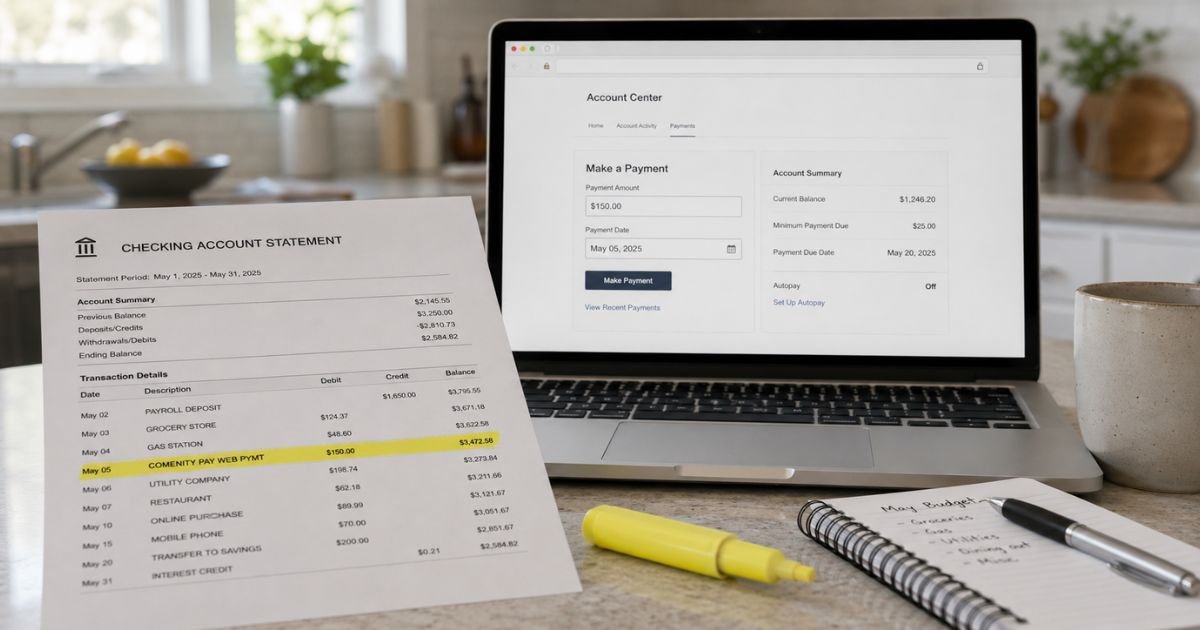
A Comenity Pay charge on credit card or bank statement can feel confusing if you don’t recall signing up for anything. The name does not look like a store you shop. The amount may match a bill you already forgot.
This guide explains what the label usually means, how to match it, and how to stop future pulls if you no longer want AutoPay.
Table of Contents
What Is a Comenity Pay Charge on Credit Card?
A Comenity Pay charge on bank statement is typically money moving to a store-branded card issued by Comenity.
On a checking or savings statement, it is usually an ACH or web payment you made, or AutoPay made for you. It is generally not a store checkout fee with that exact name.
Comenity Bank and Comenity Capital Bank are real U.S. banks. They are part of Bread Financial, the company that used to use the Comenity brand more widely.
Bread Financial’s help pages say those two banks issue credit cards and other financing.
You may have opened the card at a register for a first-purchase discount. The store name is on the plastic. The bank that bills you is Comenity or Bread Financial. That is why your bank prints Comenity Pay instead of the boutique or beauty chain.
Comenity Pay is not a separate app like Venmo. Official tools include Account Center, the Bread Financial app, AutoPay, and EasyPay. EasyPay lets you pay a Comenity card with an account number even if you have not registered online.
Bread Financial also offers Bread Pay installment and SplitPay products through Comenity Capital Bank. Those are different from a store-card bill payment. Match the amount to your card statement before you assume it is a new loan.
The Columbus, Ohio BBB profile for Comenity and Comenity Capital Bank lists the business as accredited with an A+ rating.
The same company still draws many billing and service complaints because it handles a huge number of store cards. A Comenity Pay line by itself is not proof of a scam.
How the Charge May Appear on Your Statement
Banks shorten the words. Extra letters are often location or program codes, not a second company. OH often points to Ohio, a common Comenity billing location.
| What you may see | What it often means |
|---|---|
| COMENITY PAY | A payment tied to a Comenity-serviced card |
| COMENITY PAY WEB PYMT | An online or portal payment |
| COMENITY PAY OH WEB PYMT | Same idea, with an Ohio location tag |
| COMENITY PAY CP WEB PYMT | A web payment with an internal program code |
| COMENITY PAY AUTO PAY | A scheduled AutoPay debit |
| COMN CAP APY | Often reported as a Comenity Capital AutoPay-style debit |
| COMENITY BANK | A general Comenity bank descriptor |
Two-letter codes such as CP, SB, BH, or II generally vary by card program. Public lists try to map them to brands, but those maps are not official. Use your own card statement to confirm the account.
Why You Might See This Charge
The most common reason is a payment on a store card. You paid online, by phone, through EasyPay, or through your bank’s bill pay. Your checking account shows Comenity Pay. Your store-card account should show a payment credit for the same amount.
AutoPay is the next common reason. Bread Financial says you can enroll in AutoPay in the member portal or app. Once it is on, the bank can pull the amount you chose each cycle. That can be the minimum, the statement balance, or another amount you selected.
People also forget old cards. A register signup from last year can still have a small balance, a late fee, or a leftover AutoPay link. The store may have changed owners. The billing name on your bank line stays Comenity.
A spouse, parent, or authorized user can pay the card from a joint checking account. The payment is real. You may not remember who clicked Pay.
Less often, the line is a reversal or a returned payment. If a prior debit failed, Comenity may retry or post related fees on the card. Check both the bank statement and the card statement before you treat it as a new purchase.
How to Verify a Comenity Pay Charge
Start with the store card, not a dispute. The payment should appear as a credit on that account.
- Look at the amount and date on your bank line.
- Sign in to Account Center or the Bread Financial app for every store card you have.
- Open recent payments and statements. Match the same amount and date.
- Check paper statements and email receipts if you never registered online.
- Search old emails for “Comenity,” “Bread Financial,” or a store card approval.
If you have several store cards, check each one. Comenity services many brands, so one bank line will not name the boutique for you.
No login yet? Use EasyPay on Comenity’s site with the account number from a statement or card. Official help says EasyPay can take a payment without a full online account.
You can also call the number printed on your card or statement. That number can differ by brand, so use the one on your own card.
Pro Tip: Pull a year of checking activity and search “Comenity.” Recurring monthly amounts usually mean AutoPay is still on.
Is This a Subscription You Need to Cancel?
Comenity Pay is not a streaming plan. You cannot cancel “Comenity Pay” as a product name. You can change or stop the payment method that created the debit.
To stop future bank pulls, sign in and review AutoPay. Turn it off if you no longer want automatic drafts. Also remove a stored bank account if you do not want that account used again. Turning off AutoPay does not close the card or erase a balance you still owe.
If you want the card closed, request closure after you know the payoff amount. Promotional financing and deferred interest can still apply on some store cards. Read your card agreement before you assume a leftover balance is interest-free.
EasyPay is a one-time payment tool, not a membership. Using it once does not enroll you in AutoPay by itself. AutoPay is a separate setting in Account Center or the app.
Common Mistakes: People dispute a real card payment and then fall behind on the store card. Others turn off AutoPay and forget a remaining balance. A third group looks only at the checking line and never opens the matching card statement.
What If the Charge Is Not Yours?
First rule out a forgotten store card, a joint account, and AutoPay. Search your credit reports for Comenity Bank, Comenity Capital Bank, or Bread Financial accounts. A forgotten card often still appears there.
If no account matches, treat the debit as possible unauthorized use. Contact Comenity or Bread Financial through the official Account Center or the number on a statement you do have. Then tell your bank you do not recognize the ACH pull.
Do not send your full account or routing numbers by regular email. Use the company’s signed-in tools or the phone number on your card. Federal billing and ACH dispute rules generally give you a limited window, and the exact process may vary by issuer.
Consumer forums often complain about late fees, payment posting delays, and hard-to-reach support. Those reports do not make every Comenity Pay line fake. They do mean you should keep screenshots of the bank debit and the card payment page.
What to Do Next
Work this short list in order.
- Match the bank debit to a payment credit on a Comenity or Bread Financial card.
- List every store card in your wallet, email, and credit report.
- Review AutoPay and stored bank accounts in Account Center.
- Stop AutoPay if you no longer want automatic drafts.
- Pay or close any leftover card balance so fees do not keep posting.
- Contact your bank only after that search, unless you already see clear fraud.
FAQs: Comenity Pay Charge on Bank Statement
Q. What does Comenity Pay mean on my bank statement?
A. It typically means a payment to a store credit card issued by Comenity Bank or Comenity Capital Bank, part of Bread Financial. WEB PYMT generally means the payment was made online. Match the amount to the payments page on that card.
Q. Why doesn’t the charge show the store name?
A. Comenity is the bank that bills the card. Your checking account prints the bank name, not the retailer on the plastic. Open Account Center or your paper statement to see whether the card is for a beauty, clothing, home, or other store program.
Q. Is a Comenity Pay charge on credit card a scam?
A. Usually no. Comenity Bank and Comenity Capital Bank are legitimate card issuers. Stolen bank details can still be used to pay someone else’s card. If you cannot find a matching account after a careful search, contact Comenity or Bread Financial and your bank.
Q. How do I stop future Comenity Pay bills or reverse one?
A. Turn off AutoPay and remove the linked bank account in Account Center or the app. That stops future automatic drafts. It does not erase a balance you still owe. If a debit is unauthorized, ask Comenity and your bank to review it. Policies and timing may vary by issuer.
Conclusion
A Comenity Pay charge on credit card or bank statement is typically a payment to a Comenity-issued store card, often made online or by AutoPay. Start with Account Center, EasyPay, and your credit report. Match the date, amount, and payment credit.
If the charge still does not belong to you, lock down the linked bank account and work with Comenity or Bread Financial and your bank. Unfamiliar labels are often legitimate. A calm match-up is the fastest way to know which card was paid.
Disclaimer: This article is for general information only. It is not financial, legal, or tax advice. Billing labels, AutoPay rules, and dispute rights may vary by bank, card network, and Comenity or Bread Financial account. Verify any account-specific question with the company or your bank.
Meet the Author
