
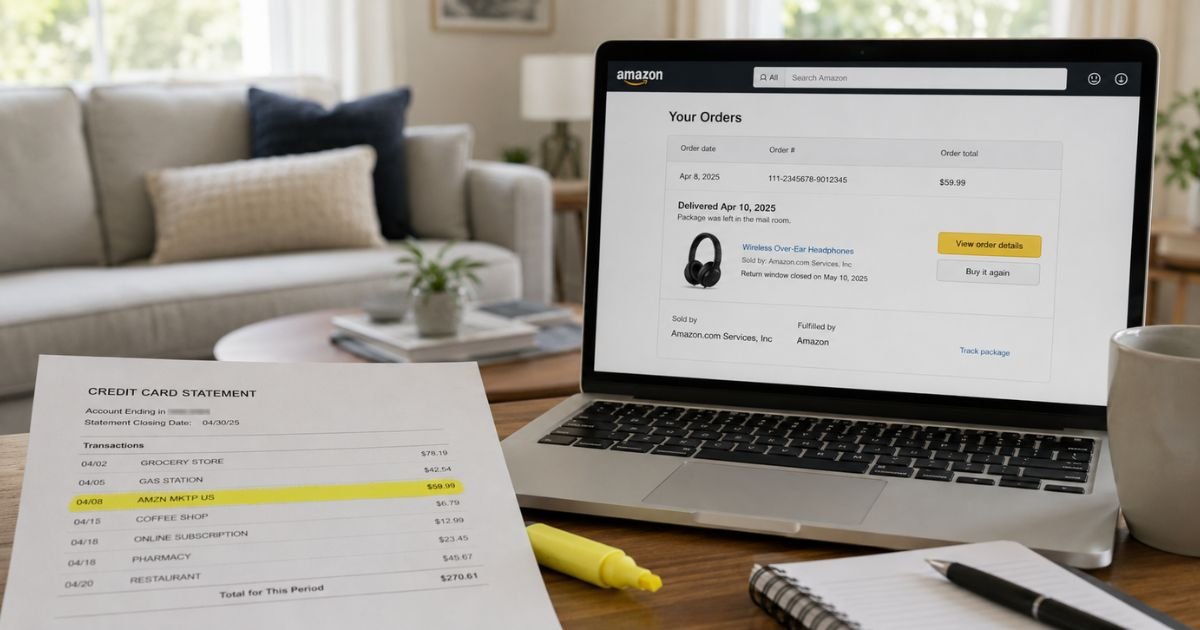
An Amazon Marketplace charge on credit card can feel confusing if you don’t recall signing up for anything. The line may say AMZN MKTP US or AMAZON MKTPLACE PMTS instead of a store name you know.
This guide explains what the label usually means, how to match it to an order, and what to do if it still does not look right.
Table of Contents
What Is an Amazon Marketplace Charge on Credit Card?
An Amazon Marketplace charge on credit card is typically a purchase billed through Amazon.com. Amazon’s official help page lists AMZN Mktp US and AMAZON MKTPLACE PMTS as descriptors for an Amazon.com purchase.
MKTP is generally short for Marketplace, and US generally points to amazon.com. Extra text such as a code or WA is usually an Amazon reference, not a second company.
This label does not always mean you bought from a third-party seller. Amazon uses the same short name for many Amazon.com orders. Look for “Sold by” and “Fulfilled by” on the order to see who handled the item.
Amazon.com is a well-known U.S. retailer. The Better Business Bureau lists Amazon.com as an accredited business with an A+ rating.
How the Charge May Appear on Your Statement
Your bank has limited space on each line. That is why you rarely see the full words “Amazon Marketplace.” The same order can look different on two cards.
| What you may see | What it often means |
|---|---|
| AMZN MKTP US or AMZN Mktp US | A common Amazon.com purchase label |
| AMZN MKTP US* plus a code | Same type of bill, with an order-style reference |
| AMAZON MKTPLACE PMTS | Listed by Amazon as an Amazon.com purchase |
| AMZN.COM or AMZN.COM/BILL | Another general Amazon.com purchase line |
| AMAZON PRIME or AMZ*Prime | Prime membership billing |
| AMZ* plus a company name | Often Amazon Pay, a different checkout path |
The letters and numbers after the asterisk are typically Amazon’s internal reference. They can help Amazon support find the charge if you contact Help in your account.
Why You Might See This Charge
Amazon generally charges you when items ship, not always on the day you click Buy. A charge can land days later. That delay is a common reason the card date does not match the day you ordered.
One checkout can create more than one bank line. Items from different sellers often ship separately. The amount on your card may match one box, not the full cart.
Subscribe & Save orders can post later too. Recurring household items can look like a new mystery charge each cycle.
A family member with a saved card can place an order you did not make. Amazon notes shared access as a common reason people do not recognize a charge.
Pending authorizations can look like posted charges. Amazon contacts your bank to confirm the card when you place an order. That hold is not the final bill and typically drops after the item ships or after you cancel.
How to Verify an Amazon Marketplace Charge
Start inside your Amazon account, not with a dispute. Amazon keeps a payment log that is often easier to match than the short bank line.
- Sign in at Amazon.com.
- Open Your Orders and filter by the dates around the charge. Shipping can lag the purchase date.
- Open Your Transactions under Your Payments. Match the amount and date there.
- Open the order and read Sold by and Fulfilled by.
- Check digital orders, gift cards, Subscribe & Save, and memberships if needed.
Compare shipment totals, not only the original checkout total. If the statement includes a code after MKTP US*, keep that code handy for Amazon Help.
If you still cannot find the line, contact Amazon through Help in your account. Have the date, amount, and last four card digits ready.
Pro Tip: Your Transactions is the page most people skip. It lists the amount that actually hit your card, which is the number that should match your statement.
Sold by Amazon vs. a Third-Party Seller
The statement label is only a starting point. The order details tell you who you paid through Amazon.
If the item is sold and shipped by Amazon, returns generally follow Amazon’s usual tools in Your Orders. If a third-party seller fulfilled the item, the return may go back to that seller instead of an Amazon warehouse.
Amazon’s help pages say seller-fulfilled returns can use a seller label, a U.S. return address, or a refund without a return. Check the return offer in Your Orders before you ship anything.
If a third-party seller does not help after you contact them through Amazon, Amazon describes an A-to-z Guarantee path for many physical goods. Read the current help page in your account for the steps and timing rules.
Confirm Sold by on the order before you pick a return path.
What If the Charge Is Not Yours?
First rule out a shared card, a household account, a Subscribe & Save box, and a pending hold. Then check whether a membership or digital order renewed.
If the charge is still unknown, treat it as possible unauthorized use. Change your Amazon password and review devices, logins, and saved payment methods.
Next, contact Amazon through your account and ask them to identify the charge. If Amazon cannot tie it to your login, tell your card issuer. Do not send your full card number by email unless Amazon asks for a secure method.
Is This a Subscription You Need to Cancel?
Amazon Marketplace is not a plan name you can cancel. It is a billing label. You cancel the order, the Subscribe & Save item, or the membership that created the charge.
If the line is a shipped order, use Your Orders to start a return or cancel unshipped items. If it is Prime or another membership, manage it under Your Memberships and Subscriptions.
Subscribe & Save is easy to miss. Open those settings and turn off any item you no longer want. A shipment that already went out may still bill.
Common Mistakes: People often dispute a pending authorization that later drops on its own. Others match only the checkout total and miss split shipments. A third group assumes MKTP always means a third-party seller, then uses the wrong return steps.
What to Do Next
Work this short list in order.
- Match the date and amount in Your Transactions.
- Add nearby shipment totals if one order does not fit.
- Read Sold by and Fulfilled by on the order.
- Review household users, saved cards, and Subscribe & Save.
- Ask Amazon to decode the line if you still cannot find it.
- Contact your bank only after that search, unless you already see clear fraud.
FAQs: Amazon Marketplace Charge on Credit Card
Q. What does AMZN MKTP US mean on my statement?
A. It typically means an Amazon.com purchase. Amazon’s help page lists AMZN Mktp US and AMAZON MKTPLACE PMTS as Amazon.com purchase descriptors. Check Your Transactions and Sold by on the order to see the exact item.
Q. Why doesn’t the Amazon Marketplace amount match one order?
A. Amazon often bills when items ship, and one cart can create more than one shipment. Each shipment generally posts as its own charge. Match shipment totals in Your Transactions, not only the original checkout total.
Q. Is an Amazon Marketplace charge on credit card a scam?
A. Usually no. Amazon.com is a legitimate retailer, and this is a common short merchant label. If you cannot match the charge in Your Transactions after a careful search, treat it as unauthorized and contact Amazon and your issuer.
Q. How do I stop future Amazon Marketplace bills or get one removed?
A. You cannot cancel the Marketplace label itself. Return or cancel the related order, turn off Subscribe & Save, or cancel the membership that billed you. If the charge is unauthorized, ask Amazon to review it, then file a dispute with your card issuer. Policies and timing may vary by issuer.
Conclusion
An Amazon Marketplace charge on credit card is typically an Amazon.com purchase with a shortened bank label. Start with Your Transactions, then Your Orders. Match dates, shipment totals, and the Sold by line.
If the charge still does not belong to you, lock down the account and work with Amazon and your issuer. Unfamiliar labels are often legitimate. A calm match-up is the fastest way to know which one you have.
Disclaimer: This article is for general information only. It is not financial, legal, or tax advice. Billing labels, refund rules, and dispute rights may vary by bank, card network, and Amazon account. Verify any account-specific question with Amazon or your card issuer.
Meet the Author
