
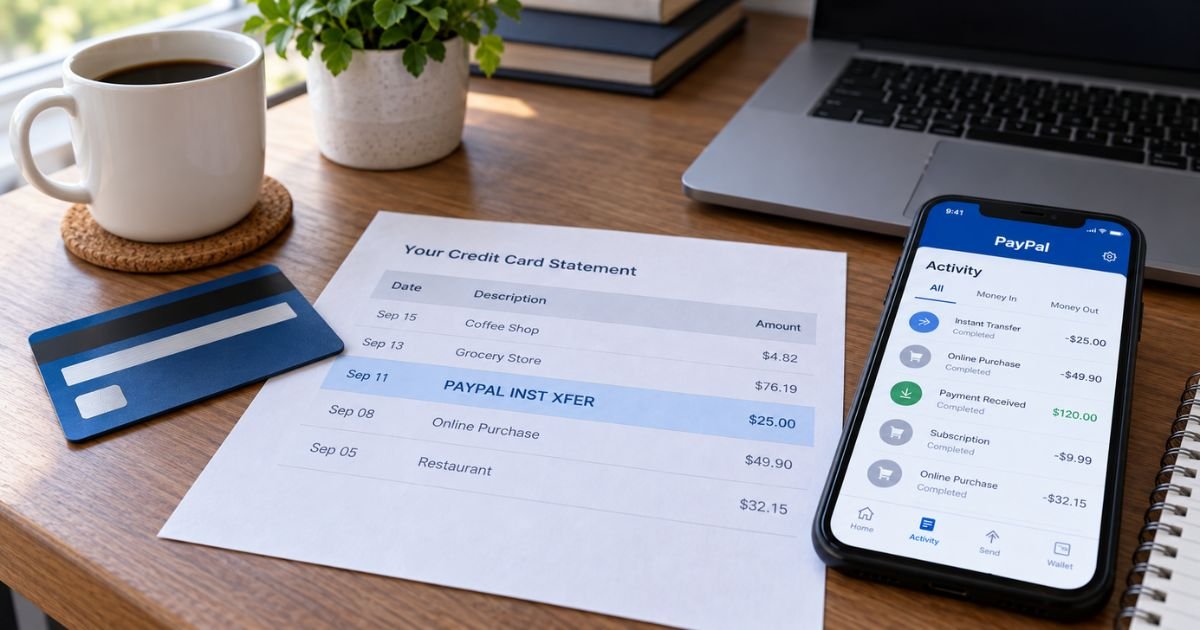
A PayPal Instant Transfer charge on a credit card can feel confusing if you don’t recall moving money through PayPal. The words look technical. The amount may not match a store name you remember.
Unfamiliar PayPal lines are often legitimate. Banks shorten “Instant Transfer” to INST XFER, and that label can cover more than one kind of payment.
This guide explains the official Instant Transfer product, how the wording usually posts, and how to match or stop it.
Table of Contents
What is a PayPal Instant Transfer charge on a credit card?
A PayPal Instant Transfer charge on credit card is usually PayPal moving money using a linked funding source. INST means instant. XFER is short for transfer.
That wording is not one single product in every case. Official Instant Transfer is PayPal’s paid way to send your PayPal balance to a linked bank account or an eligible debit card in minutes.
Official consumer fees for a U.S. personal account list that instant withdrawal at 1.75% of the amount transferred. For U.S. dollars, the listed minimum fee is $0.25 and the listed maximum is $25.00.
A standard transfer to an eligible bank or debit card is listed as no fee when no currency conversion applies.
Here is the part that trips people up. Official Instant Transfer is a withdrawal out of PayPal. It typically lands as a deposit to your bank or to the bank account behind an eligible debit card. It is not described as a transfer onto a credit card.
Official help talks about eligible Visa, Mastercard, or Discover debit cards, not credit cards, as card destinations.
So if you see a PayPal Instant Transfer charge on a credit card, you are often looking at statement shorthand, not the 1.75% withdrawal product itself.
PayPal’s own merchant help says that when a customer pays with a bank transfer, the seller name may not appear.
The customer may see PAYPALINST XFER instead. Banks also print PAYPAL INST XFER on checking accounts when PayPal pulls funds by ACH.
In short, the same four words can mean a fast withdrawal you chose, a bank-funded PayPal purchase, or a recurring PayPal billing agreement. Your PayPal Activity list is the place that names the other party.
How the line usually appears
Issuers cut text to fit. You may see extra bank codes in front.
| What you may see | What it often means |
|---|---|
| PAYPAL INST XFER, PAYPALINST XFER, PAYPAL *INST XFER | PayPal transfer or bank-funded PayPal payment; seller name may be missing |
| PAYPAL INST XFER plus a brand or truncated name | PayPal payment that still shows part of the merchant or recipient |
| PAYPAL STORENAME or PPSTORENAME | Typical card-funded PayPal checkout; the name after the star is the seller |
| PPCR, PAYPAL CREDIT, or CC REPAYME with INST XFER | Often a PayPal Credit repayment style line, not Instant Transfer itself |
| PYPL PAYMTHLY | Official Pay Monthly repayment descriptor (issuer may edit it) |
| PAYPAL1234 CODE or PP1234 CODE | Official card-confirmation charge; U.S. amount is $1.95 and is refunded after you confirm |
A debit card that posts on a bank app can look like a “card charge” even when the money left checking. Read whether the account is credit, debit, or checking before you assume a cash-advance fee.
What official Instant Transfer costs and how long it takes
Official U.S. help says Instant Transfer typically finishes within minutes. Processing can take up to about 30 minutes depending on the bank. Standard bank transfers are generally 1 to 3 business days.
A standard transfer to an eligible debit card is described as about 48 hours. Weekends and holidays can add at least one business day.
Official personal-account limits for Instant Transfer include up to $25,000 per transaction to a bank. Card transfers list $5,000 per transaction, per day, and per week, and $15,000 per month. Debit Instant Transfer also lists a $1.00 minimum. Limits can vary by account review.
The Instant Transfer fee is taken from the withdrawal, per official help. It is shown when you choose “in minutes” in Wallet. It is not a mystery add-on after the fact if you picked that option on screen.
Business PayPal accounts can have different instant-withdrawal rates. Official merchant fee pages list other percentages. Use the consumer fee page for a personal wallet.
Why you might see it without choosing “Instant”
You may have paid a website with PayPal and used your bank as the funding source. That purchase can print as INST XFER on the bank side even though you never opened the Transfer Money screen.
PayPal may also charge a backup card if a bank debit fails. Official help on adding money notes that a linked card can be used if PayPal cannot debit the bank. That backup charge can show on the card, sometimes with PayPal wording that does not match the store you remember.
A household member, an old login, or Automatic Payments can bill the same wallet. Friends-and-family sends funded by a card are PayPal charges too.
Some issuers treat card-funded person-to-person sends as cash-like. That treatment varies by issuer. Check your card’s cash-advance rules if the APR looks different from a normal purchase.
Pro Tip: Open PayPal Activity first and sort by the statement date. The in-app name of the seller or recipient is usually clearer than the bank’s 22-character line.
How to match the charge in PayPal
- Sign in only at paypal.com or in the official app.
- Open Activity and find the same date and amount.
- Tap the payment. Read the merchant, friend, or “Transfer to bank” detail.
- Open Wallet and note which bank or card is the preferred funding source.
- Open Settings, then Payments, then Automatic payments. Cancel any billing agreement you do not want.
Download a custom activity report if the app list is long. Official help lets you export history from the website.
If nothing matches, try every email you have used with PayPal. A second account is a common reason a charge “is not in my app.”
How to stop future Instant Transfer activity
You cannot “cancel PayPal” the way you cancel one streaming app. You stop each path that can move money.
- Turn off Automatic Payments you do not recognize.
- Change the preferred funding source away from the card or bank that was hit.
- Remove a card or bank from Wallet if you no longer want it linked.
- For Instant Transfer withdrawals, simply choose the free standard option next time, or do not transfer out.
Official help says many PayPal-to-PayPal sends finish in minutes, so you usually cannot cancel after they complete. If a Cancel control still shows on the transaction, use it. Otherwise use Resolution Center.
PayPal’s official contact path is the Contact link on paypal.com or Help in the app. Official help says calls are answered every day from 8 a.m. to 8 p.m. CST after you pick a reason. Use Resolution Center for unauthorized access or purchase problems.
Common Mistakes: Closing only the shopping app does not stop PayPal billing. Ignoring Automatic Payments leaves the next renewal in place. Using a link from a text that says “verify Instant Transfer” can be phishing.
Lookalikes that are not Instant Transfer
- A normal PAYPAL *merchant purchase on the card
- Venmo, which is related but posts under its own name
- PayPal Credit or Pay Monthly repayments
- The official $1.95 card-confirmation charge
- Zelle, Cash App, or a bank’s own “instant transfer” product
- A wire, which is a different bank rail
Open paypal.com yourself. Do not type a card number into a page you reached from a surprise email.
If you did not authorize the charge
Change your PayPal password and turn on two-step verification. Review devices and Automatic Payments. Report the item in Resolution Center as unauthorized if it is not yours.
Then call the card or bank that shows the line. For credit cards, federal billing-error rules generally give you 60 days after the statement was sent to dispute in writing. Many issuers also let you start that in the app. Debit timing can differ.
Do not read one-time passcodes to anyone who called you. PayPal will not need those codes to “release a transfer.”
FAQs: PayPal Instant Transfer Charge on Credit Card
Q. Is a PayPal Instant Transfer charge on a credit card always the 1.75% fee?
A. No. Official Instant Transfer is the paid withdrawal from your PayPal balance to a linked bank or eligible debit card. A credit-card line labeled INST XFER is more often a PayPal payment or a bank-funding label. Match the amount in Activity before you assume you paid the withdrawal fee.
Q. Why is there no store name next to INST XFER?
A. Official merchant help says bank-transfer PayPal payments may show only PAYPALINST XFER, not the business name. Your issuer can also truncate the rest of the line. PayPal Activity is where the seller or recipient usually appears in full.
Q. Can I reverse an Instant Transfer after it posts?
A. Official help says instant PayPal sends and many fast withdrawals cannot be canceled once they finish. If Cancel still appears on that Activity item, use it. If it does not, open Resolution Center or contact the recipient and your bank. Speed is the tradeoff for the fee.
Q. Does Instant Transfer mean someone stole my card?
A. Not by itself. PayPal is a real company, and INST XFER is a common descriptor. Treat it as unauthorized only after you check Activity, Automatic Payments, and other household logins. If nothing matches, lock the wallet and file with PayPal and your issuer.
Conclusion
A PayPal Instant Transfer charge on a credit card is typically PayPal moving money, either as the official paid withdrawal to a bank or debit card or as statement shorthand for a bank-funded PayPal payment.
Official personal Instant Transfer is listed at 1.75% with a $0.25 minimum and $25.00 maximum in U.S. dollars. Confirm the other party in PayPal Activity, review Automatic Payments, and use Resolution Center plus your issuer if the line is not yours.
Disclaimer: This article is for general information only. It is not financial, legal, or tax advice. PayPal fees, descriptors, limits, and dispute windows vary by account type, funding source, and issuer. Verify account-specific questions with PayPal or your bank before you dispute or unlink a payment method.
Meet the Author
