
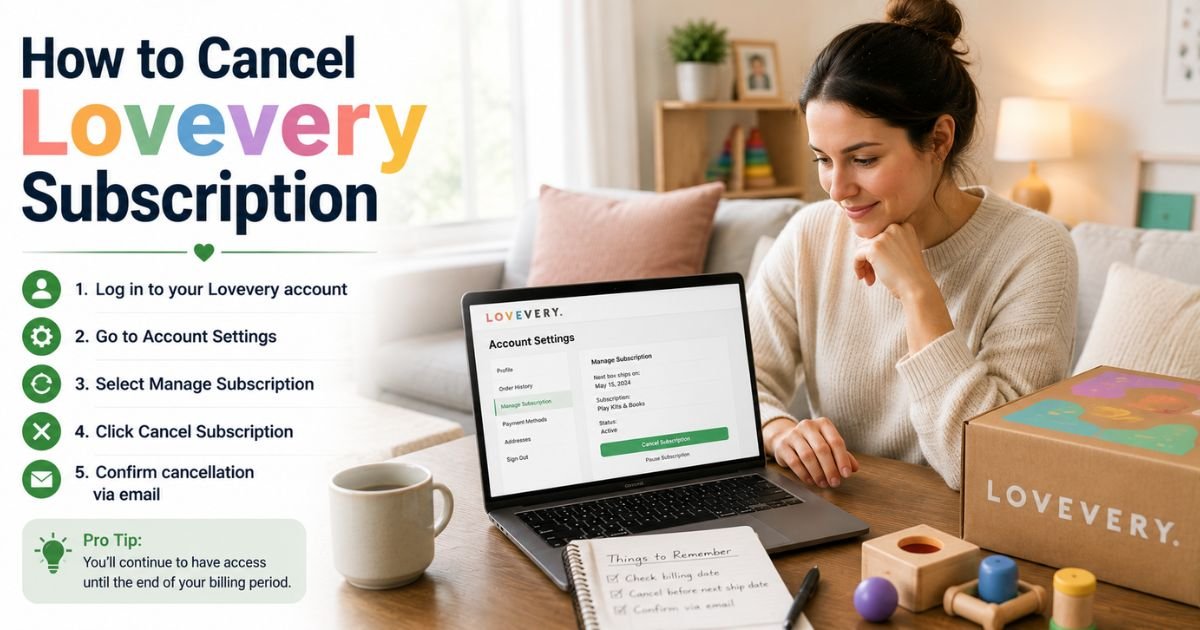
Lovevery sends stage-based Play Kits filled with developmental toys and guides matched to your child’s age. Many parents also subscribe to the Early Reader Club for books.
Canceling can feel unclear if you are not sure where the settings live or how the shipping calendar works. The process is usually straightforward once you know the steps.
This guide walks you through the official ways to stop future charges, what happens next, and how to handle common issues.
Table of Contents
What Is Lovevery and How Billing Works
Lovevery offers two main recurring options. The Play Kits Subscription delivers age-appropriate toys, a play guide, and app access.
Kits generally ship every 2 months for ages 0–12 months and every 3 months after that, up to around age 5 or until you cancel.
The Early Reader Club focuses on books and ships on its own schedule. You can choose pay-per-kit billing or a Prepay & Save option.
Prepay plans typically convert to pay-per-kit when the prepaid period ends unless you cancel or prepay again.
Prices commonly run about $80 per kit for the youngest ages and $120 for older stages, though exact amounts can vary and may change with notice.
Subscribers often gain access to the Lovevery app, parenting courses, and a Subscriber Shop. Individual kits can also be bought without a subscription, but the recurring plan is the most common source of ongoing charges.
How to Cancel from the Website
The official and fastest method is online through your account on the website. Settings are not currently available inside the Lovevery app.
- Go to lovevery.com and sign in with the email and password linked to your subscription.
- Click your profile or account icon and select Account Settings.
- Scroll to Manage Subscription (for Play Kits) or Manage Reading Subscription (for Early Reader Club).
- Choose the option to cancel your subscription. You can also skip the next delivery if you only want a temporary break.
- Confirm the cancellation and watch for an email confirmation. Save that email for your records.
Cancel at least 3 days before the next scheduled shipping date so the change takes effect.
If you already received a recent order or shipping confirmation, canceling the subscription will not stop that active shipment.
For Prepay & Save plans, contact support if you need to skip a specific kit.
How to Cancel by Contacting Customer Care
If you cannot access your account or prefer help from the team, reach out through official channels.
Use the blue chat icon on lovevery.com to talk with the automated assistant Avery, available 24/7. During business hours (typically 9 a.m. to 4:30 p.m. Mountain Time, Monday through Friday), you can connect with a live Customer Experience team member.
You can also email heretohelp@lovevery.com or submit a request through the help center form.
Include your account email, order or subscription details, and a clear request to cancel. Responses may take 1–2 business days if a human agent is needed.
Keep records of every message. This path is useful if the website options do not appear or if you need help with a prepaid balance.
What Happens After You Cancel
Once cancellation is confirmed and the 3-day window is respected, future kits stop shipping and new charges should end.
You typically lose free access to the full Lovevery app unless you choose a separate app-only subscription.
Any prepaid Play Kits you have not yet received are generally refunded to your original payment method within 3–5 business days.
You can usually reactivate later through the same Account Settings page if your child is still within the eligible age range.
Missed kits can often be purchased later through the Subscriber Shop at subscriber pricing while you remain eligible.
Common Problems and How to Solve Them
- Cannot find the cancel button — Use a web browser on lovevery.com rather than the mobile app. Settings live only on the website.
- Still charged after canceling — Check the exact shipping date and confirm you canceled at least 3 days prior. Contact support with your confirmation email and request a review.
- Already shipped order — Cancellation does not reverse an order that has already processed or shipped. Reach out promptly if you need help with that shipment.
- Slow support replies — Start with the on-site chat. Follow up by email and keep screenshots of all communication.
- Prepaid plan questions — Support can clarify remaining balance and refund timing.
See also: How to verify unfamiliar charges on your credit card statement for related billing tips.
Refund Policy
Lovevery states that if you cancel a subscription with prepaid Play Kits you have not received, the purchase price of those unreceived kits is refunded to the original payment method, typically within 3–5 business days.
Refunds for already-delivered kits or other products follow separate return rules (generally a limited window after delivery and may require the items to be returned unaltered).
Policies can vary by plan type, location, and specific order. Always confirm the details for your account directly with Lovevery, as individual situations differ.
Expert Tips for Easy Cancellation
- Log in and check your next shipping date first so you cancel with enough lead time.
- Take screenshots of the Manage Subscription page before and after you cancel.
- Save the confirmation email immediately.
- Update or remove your payment method after canceling if you want extra peace of mind.
- Consider skipping one kit first if you are unsure about fully ending the subscription.
- If customer service is slow, keep polite written records in case you need to involve your bank later.
FAQs: How to Cancel Lovevery Subscription
Q. Can I cancel Lovevery in the mobile app?
A. No. Account Settings for skipping or canceling are currently available only on the lovevery.com website, not inside the app.
Q. How far in advance do I need to cancel?
A. Cancel at least 3 days before your next shipping date for the cancellation to take effect and stop the upcoming kit.
Q. Will I get a refund for prepaid kits I have not received?
A. Yes, Lovevery generally refunds the purchase price of unreceived prepaid Play Kits to your original payment method within 3–5 business days after cancellation.
Q. Can I restart a canceled Lovevery subscription later?
A. Yes. Log back into Account Settings and choose Reactivate if your child is still within the eligible age range. You will select a payment plan at that time.
Conclusion
Canceling a Lovevery subscription is usually a quick process once you sign in on the website and open Account Settings. The key is acting at least 3 days before the next ship date and saving your confirmation.
Whether you have Play Kits, the Early Reader Club, or both, the same account tools handle the request. If anything looks unclear on your end, the on-site chat or email support can walk you through it.
Following the official steps and keeping simple records helps you stop future charges cleanly and move on with confidence.
Disclaimer: This article is for informational purposes only and is not financial, legal, or professional advice. Subscription policies, refund timelines, and account options can change and may vary by location or individual account. Always verify the latest details and your specific situation directly with Lovevery or your payment provider.
Meet the Author
