
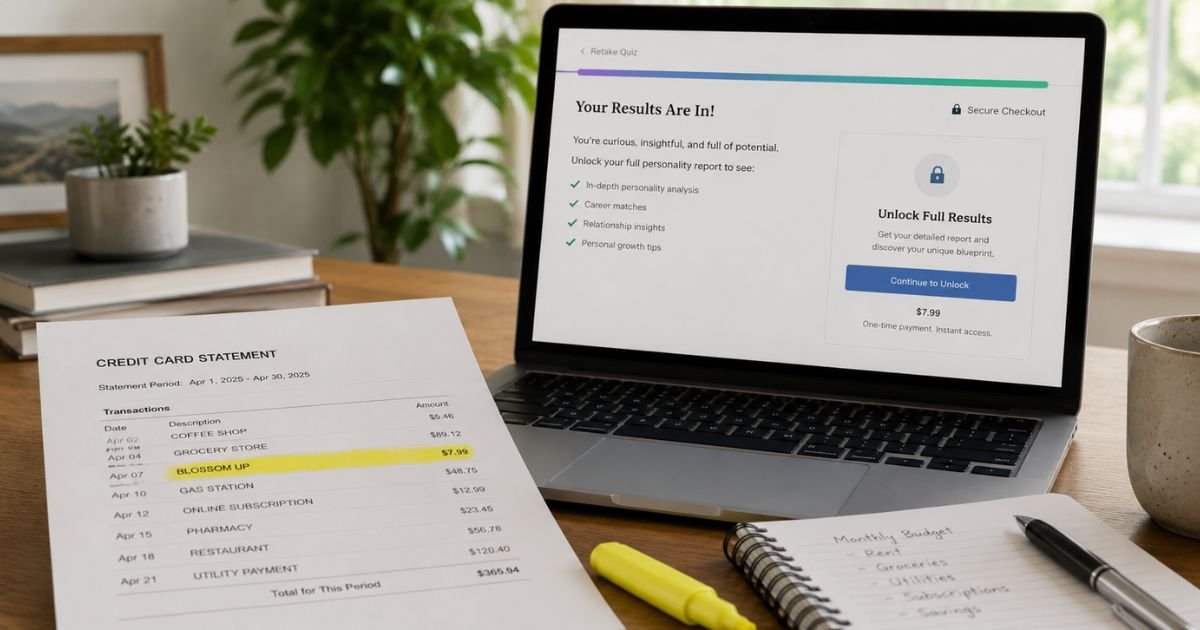
A Blossom Up charge on credit card can feel confusing if you don’t recall signing up for anything. You may only remember a short online quiz, a personality test, or a $2 unlock for results.
This guide explains what the label usually means, how to match it, and how to cancel future billing.
Table of Contents
What Is a Blossom Up Charge on Credit Card?
A Blossom Up charge on credit card is typically a payment to BlossomUp. The company sells online quizzes, reports, and membership access.
Official pages describe personality tests, IQ-style reports, love-style quizzes, and similar self-insight tools.
BlossomUp’s own help center says an initial charge is followed by a recurring charge of $29.95 every 4 weeks. That renewal, according to the same help article, starts 7 days after your first payment.
Checkout pages commonly show a small amount due today, often around $1.95, then the higher 4-week price if you do not cancel.
The company is a real website with terms, a help center, and a cancellation path. That does not mean every shopper felt the price was clear.
Trustpilot lists a claimed blossomup.co profile with a mixed score near 4.0 and a large review volume. Many 1-star reviews and Reddit threads describe the same pattern: a cheap quiz unlock, then a larger recurring bill.
A BBB profile for Transcend Labs LLC includes consumer reviews that describe Blossom Up quiz billing. That profile is not BBB accredited.
Treat the legal-entity link as a consumer-report signal, not as a full corporate filing you have verified on the BlossomUp homepage.
How the Charge May Appear on Your Statement
Banks shorten merchant names. You may not see the full website. Look for close spellings, not only the two-word phrase.
| What you may see | What it often means |
|---|---|
| BLOSSOM UP or BlossomUp | The usual merchant label |
| BLSSMUP | A shortened bank descriptor noted on BlossomUp billing help |
| blossomup.co | The company’s website name on some issuers |
| A small first amount near $2 | Often the intro or trial unlock shown at checkout |
| About $29.95 every 4 weeks | The recurring price stated in BlossomUp help |
Your issuer may add a city, a website fragment, or a processing code. That extra text is usually formatting, not a second company.
BlossomUp’s pricing page also mentions a 7-day full-access offer and, in another line, auto-renew after 14 days.
Those two timelines do not match the help-center wording. Plans can vary by checkout. Use the receipt or confirmation email for your exact terms.
Why You Might See This Charge
The usual path starts with an ad or a “free” quiz. You answer questions. Then the site asks for a card to unlock the full report. The first charge is small, so it can feel like a one-time fee.
If you do not cancel before the trial window ends, BlossomUp says the plan renews. The next bill is much larger and repeats every 4 weeks unless you stop it. That is why the statement date may be a week or more after the quiz.
You might also see more than one amount. The intro charge and the first renewal can land in the same statement cycle. Family members who used a saved card for a quiz can create a charge you did not take yourself.
Pending authorizations can look like posted charges for a short time. If a first attempt failed, a later retry may post. Match the date to your email, not only to the day you took the quiz.
How to Verify a Blossom Up Charge
Start with your email and the BlossomUp account, not with a dispute. Search inbox and spam for “BlossomUp,” “Blossom Up,” “hello@blossomup.co,” or “billing@blossomup.co.”
- Note the date and amount on your card statement.
- Open any confirmation or receipt from the quiz checkout.
- Sign in at blossomup.co and check Membership and Payment Details.
- Compare the billed amount with the plan shown at checkout.
- If you cannot log in, use the official cancel-request form with the email you used on the quiz.
Keep screenshots of the statement line and any checkout text you can still find. Those details help support and your issuer if you need a review.
Pro Tip: Search your browser history for blossomup.co and the quiz name. The checkout page often shows the renewal price in small type under the “due today” amount.
How to Cancel a Blossom Up Subscription
BlossomUp publishes two official cancel paths. Use them before you assume the charge will stop on its own.
First, try your account. Official help says to log in, open Membership from your profile menu, and select Cancel Membership.
Canceling the membership is not the same as deleting the account. The company says you generally keep access until the current period ends, and later renewals should stop.
Second, use the cancel-request form if you cannot log in. Official help says to enter the email on the subscription.
If a plan is active, BlossomUp says it sends a confirmation link that is valid for 6 hours. Check spam if that email does not arrive.
After you cancel, watch the next statement. A renewal already in process may still post. If another charge appears, contact billing support with the date and amount.
BlossomUp’s billing-help page also claims a 30-day money-back guarantee and lists billing@blossomup.co. Refund results vary in consumer reports. Do not treat a published guarantee as a promise that your issuer will reverse every bill.
Common Mistakes: People delete the account and think billing has stopped. Official help says deletion is not the same as cancellation. Others wait on email support while the 4-week renewal date passes.
What If the Charge Is Not Yours?
First rule out a quiz you took on your phone, a family member’s checkout, and a trial that already renewed. Then check whether the email on the account is one you still use.
If you never visited the site and cannot find any receipt, treat the charge as possible unauthorized use. Change passwords on your email if that inbox was used at checkout. Ask your card issuer to block future merchant billing from this descriptor.
You can still cancel through BlossomUp’s form so the company has a record. Then file a dispute with your issuer if the charge remains unexplained.
For credit cards, federal billing rules generally give you a window after the statement first shows the charge. Your issuer can explain its exact process.
Stay calm if reviews look harsh. Many complaints are about surprise renewals, not about a fake company name. The practical fix is still the same: cancel the plan, then stop the card from paying it again.
What to Do Next
Work this short list in order.
- Match the statement to a BlossomUp receipt or Membership page.
- Cancel inside the account, or use the official email cancel form.
- Save the cancellation email and confirmation link result.
- Watch the next billing window for another $29.95-style renewal.
- Ask your issuer to block the merchant if a charge posts after you cancel.
- Dispute only the charges you still cannot tie to a plan you meant to keep.
FAQs: Blossom Up Charge on Credit Card
Q. What is a Blossom Up charge on my credit card?
A. It is typically a payment to BlossomUp for a quiz report or membership. Official help says an initial charge is followed by $29.95 every 4 weeks, starting 7 days after the first payment. Check your checkout email for the exact plan you were shown.
Q. Why did I only expect a $1.95 quiz fee?
A. Checkout often shows a small amount due today to unlock results. The same page and help articles also describe a recurring membership if you do not cancel in time. Many readers miss the 4-week price because it sits below the intro total.
Q. Is a Blossom Up charge on credit card a scam?
A. BlossomUp is a real site with published terms, cancel steps, and billing support. Consumer reviews still often call the signup confusing. If you cannot find any account or receipt after a careful search, treat the charge as unauthorized and contact BlossomUp and your issuer.
Q. How do I stop future Blossom Up bills or get one removed?
A. Cancel Membership in your account, or use the official cancel form sent to your signup email. Then watch the next cycle. For a refund, BlossomUp points to its billing form and billing@blossomup.co. If that does not resolve it, ask your card issuer about a dispute. Policies and timing may vary by issuer.
Conclusion
A Blossom Up charge on credit card is typically a BlossomUp quiz or membership bill that started with a small unlock fee. Start with your email and the Membership page. Cancel through the official account path or cancel form, then confirm that the 4-week renewal stops.
If the charge still does not belong to you, block the merchant with your issuer and keep your cancellation record. Unfamiliar labels are often legitimate subscriptions. A calm match-up is the fastest way to know which one you have.
Disclaimer: This article is for general information only. It is not financial, legal, or tax advice. Prices, trial windows, refund rules, and dispute rights may vary by plan, checkout page, and card issuer. Verify any account-specific question with BlossomUp or your bank.
Meet the Author
