
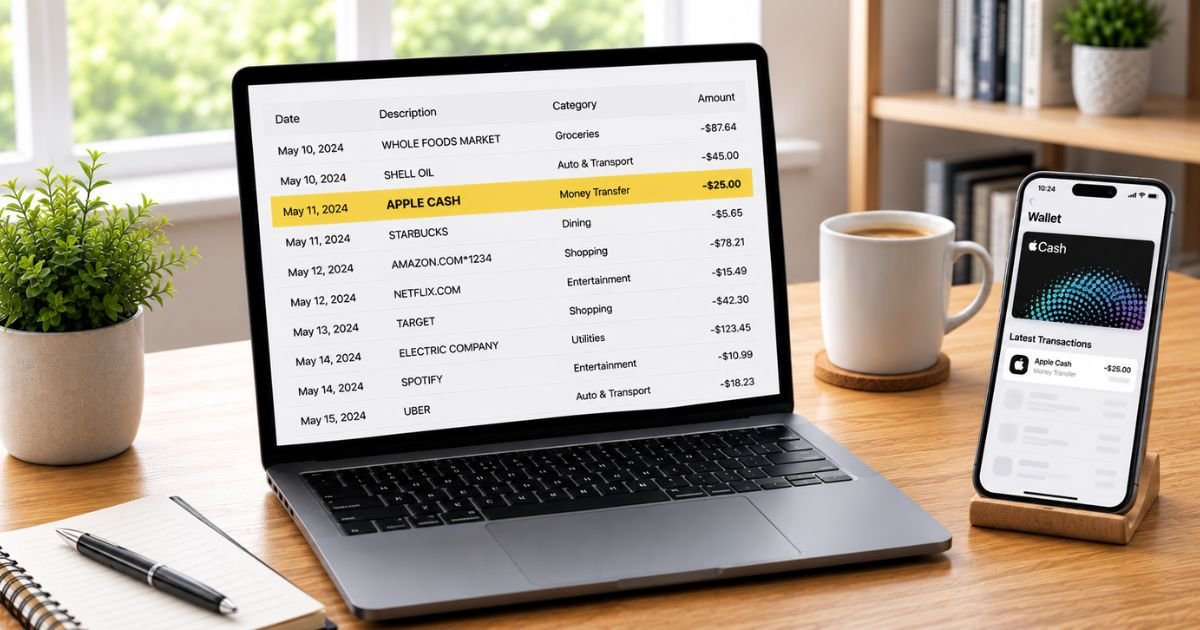
Seeing an Apple Cash charge on bank statement can be confusing, especially if you do not remember sending money or adding funds.
You’re not alone. Many people notice entries such as “APPLE CASH SENT MONEY” and want a clear explanation right away.
This guide explains what the charge means, why it appears, how to check it, and what to do if it looks unauthorized.
Table of Contents
What Is an Apple Cash Charge?
Apple Cash is a digital cash and person-to-person payment service built into the Wallet app on iPhone, iPad, and Apple Watch.
It lets you send and receive money through Messages, the Wallet app, or Tap to Cash, and spend the balance with Apple Pay.
The service is provided by Green Dot Bank.
When money moves between your bank account or debit card and Apple Cash, the transaction can appear on your bank statement.
Common descriptors include:
- APPLE CASH SENT MONEY
- APPLE CASH
- APPLE CASH INST XFER
- APPLE CASH BALANCE ADD
- Similar variations, sometimes with “1 Infinite Loop CA”
These are not Apple Store or App Store purchases (those usually show as apple.com/bill). They relate specifically to funding, sending, or transferring Apple Cash.
Why Did This Charge Appear?
Common legitimate reasons include:
- You sent money via Apple Cash and your available Apple Cash balance was lower than the amount, so the remainder was charged to a linked debit card.
- You added money to your Apple Cash balance from a debit card.
- Someone with access to your device or a linked debit card sent money using Apple Cash.
- An Instant Transfer moved money from Apple Cash to your debit card or bank account (this appears as a credit or transfer, not a withdrawal).
- A family member used Apple Cash Family features on a shared setup.
The amount charged to your debit card is shown at the time of the transfer in the Wallet app.
How to Verify the Charge
Use this checklist:
- Note the exact amount, date, and full descriptor on your bank statement.
- Open the Wallet app on your iPhone, tap your Apple Cash card, and review the Transactions list.
- Look for a matching send, receive, or add-money transaction around the same date and amount.
- Check whether any linked debit cards in Wallet were used for the payment.
- Ask household members if they sent money or added funds using a shared device or card.
- Request a transaction statement PDF from the Apple Cash card details if you need a longer history.
A matching entry in the Wallet app usually confirms the charge is expected.
Is It Legitimate or Fraud?
Legitimate scenarios
Most Apple Cash charges on a bank statement are the result of sending money when the Apple Cash balance was insufficient or adding funds to the balance. The debit card used is one that was stored in Wallet at the time of the transaction.
Warning signs
- No matching transaction appears in your Apple Cash history in Wallet.
- You did not send money or add funds, and no one with access to your devices did either.
- Multiple unexpected “APPLE CASH SENT MONEY” entries appear.
- The charge posts even though Apple Cash was turned off or restricted.
Unauthorized charges of this type have been reported by users. In many cases the linked debit card itself was compromised and used to fund Apple Cash sends.
How to Manage or Stop Future Charges
To limit future Apple Cash activity involving your bank account:
- Open Wallet, tap your Apple Cash card, and review settings.
- Remove or update linked debit cards if you no longer want them available for Apple Cash.
- Turn off Apple Cash if you do not use the service (you can re-enable it later).
- Use strong device passcodes, Face ID or Touch ID, and keep your Apple Account secure with two-factor authentication.
- For ongoing issues, contact an Apple Cash Specialist at Green Dot Bank.
Official support number for Apple Cash: 877-233-8552.
You can also reach support from the Wallet app by going to your Apple Cash card → More button → Card Details → phone icon.
Can You Get a Refund?
- Legitimate person-to-person payments that have been accepted generally cannot be reversed through Apple Cash.
- If the charge is unauthorized, report it promptly to both your bank and Green Dot Bank (Apple Cash support).
- Your bank or credit union handles debit-card disputes under Regulation E. Contact them as soon as possible. Provisional credit is often available within 10 business days, with full investigation typically completed in 45–90 days.
- Green Dot Bank investigates unrecognized Apple Cash transactions and will provide a decision.
Keep records of the bank statement, Wallet screenshots, and all reference numbers from support calls.
What to Do If the Charge Is Unauthorized
- Contact your bank or credit union immediately and report the debit-card transaction as unauthorized.
- Secure your Apple Account (change password, review devices, enable two-factor authentication).
- Open Wallet and check Apple Cash transactions for any matching activity.
- Call an Apple Cash Specialist at Green Dot Bank at 877-233-8552 to report the unrecognized charge.
- Consider removing debit cards from Wallet or disabling Apple Cash until the issue is resolved.
- Document every conversation with dates and reference numbers.
- Monitor your accounts and credit reports for 60–90 days.
- If broader identity theft is suspected, file a report at IdentityTheft.gov.
Act quickly to improve the chances of recovery and to limit further activity.
Prevention Tips
- Review bank and credit-card statements within a few days of posting.
- Set up transaction alerts on your debit cards.
- Keep only the payment methods you actively use in Wallet.
- Use a strong device passcode and biometric authentication.
- Regularly review Apple Cash transactions in the Wallet app.
- Avoid sharing devices or Apple Account credentials.
- Turn off Apple Cash if you do not need the person-to-person features.
- Be cautious of phishing messages that ask you to verify Apple Cash or Wallet activity.
Common Apple Cash Statement Descriptors
| Descriptor Seen | Typical Meaning |
|---|---|
| APPLE CASH SENT MONEY | Money sent via Apple Cash (often funded by debit card) |
| APPLE CASH | General Apple Cash activity |
| APPLE CASH INST XFER | Instant transfer to/from bank or debit card |
| APPLE CASH BALANCE ADD | Funds added to Apple Cash balance |
Typical Next Steps Timeline
| Action | Usual Timeframe |
|---|---|
| Bank provisional credit (dispute) | Within 10 business days |
| Full bank investigation | 45–90 days |
| Green Dot / Apple Cash review | Varies; contact promptly |
FAQs: Apple Cash Charge on Bank Statement
Q. Why does the charge say Apple Cash instead of a person’s name?
A. Bank statements show the payment service used (Apple Cash), not the individual recipient. The recipient details appear in your Wallet transaction history.
Q. Is an Apple Cash charge the same as an Apple Pay purchase?
A. No. Apple Pay purchases at stores or online usually show the merchant name. Apple Cash charges relate to sending money, adding funds, or transfers involving the Apple Cash balance.
Q. How do I see all my Apple Cash activity?
A. Open the Wallet app, tap your Apple Cash card, and view the Transactions tab. You can also request a PDF statement of the last 12 months from Card Details.
Q. What if the charge does not appear in my Wallet app?
A. Treat it as potentially unauthorized. Contact your bank to dispute the debit-card transaction and call Green Dot Bank Apple Cash support at 877-233-8552 to report it.
Conclusion
An Apple Cash charge on bank statement most often reflects money sent or added through Apple Cash when a linked debit card was used to cover the amount.
Check the Wallet app for a matching transaction, contact Green Dot Bank support at 877-233-8552 for unrecognized activity, and dispute unauthorized debit-card charges with your bank promptly.
Reviewing statements and managing the payment methods stored in Wallet will help you stay in control of these transactions.
Disclaimer: This article is for informational purposes only and is not financial or legal advice. Apple Cash is provided by Green Dot Bank. Policies and contact details can change. Always verify information directly with Apple, Green Dot Bank, your bank, or a qualified professional before taking action.
Meet the Author
