
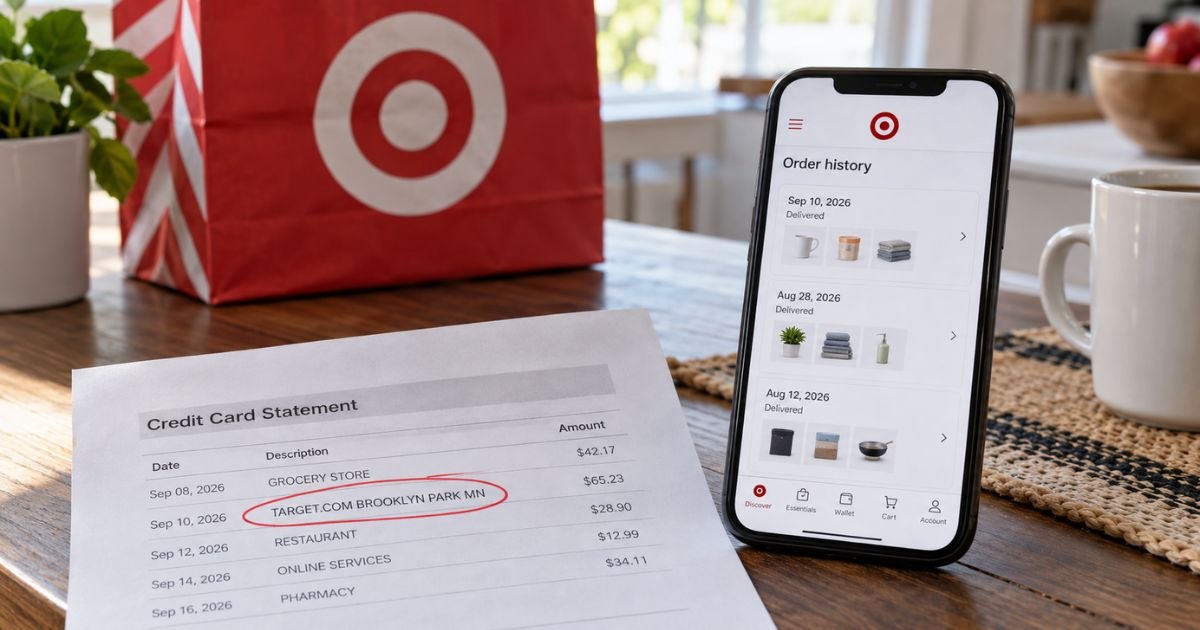
A Target.com Brooklyn Park MN charge on credit card can feel confusing if you don’t recall signing up for anything in Minnesota. You may live far away and still see that city on your statement.
Unfamiliar Target lines are often legitimate online orders, app purchases, or account bills. This guide explains what the wording usually means, how to match it, and what to do if it still looks wrong.
Table of Contents
What Is a Target.com Brooklyn Park MN Charge on a Credit Card?
A Target.com Brooklyn Park MN charge on credit card is typically a Target Corporation purchase processed as an online or digital transaction. The city and state are a billing location tag. They do not always mean you shopped inside a store in Brooklyn Park.
Target is a real U.S. retailer. Corporate headquarters sit at 1000 Nicollet Mall in Minneapolis. Target also runs a large Northern Campus at 7000 Target Parkway in Brooklyn Park, MN 55445. Some statements print that city, or ZIP 55445, next to TARGET.COM.
Target does not publish a full public glossary of every card descriptor. The pattern is still consistent across banks. TARGET.COM plus Brooklyn Park MN usually points to Target.com, the Target app, or related digital billing, not a random third-party shop.
Why Brooklyn Park MN shows up
Card networks often print a merchant city. For Target.com, that city is frequently Brooklyn Park, Minnesota. You can live in another state and still see it.
Brooklyn Park has more than one Target-related address. That is why the wording can look like a local store visit when it is not.
| Location | Address | What it usually is |
|---|---|---|
| Northern Campus | 7000 Target Pkwy, Brooklyn Park, MN 55445 | Corporate campus. ZIP 55445 often matches TARGET.COM billing tags. |
| Retail store #693 | 7535 W Broadway Ave, Brooklyn Park, MN 55428 | Public SuperTarget store. In-store lines more often use a store number. |
If your line says TARGET.COM and Brooklyn Park, treat it first as an online or account charge. If it says TGT STORE plus a store number and Brooklyn Park, it is more likely an in-store swipe.
How the charge may appear
Issuers shorten names in different ways. The same Target.com order can look slightly different on two banks.
Common variations include:
- TARGET.COM BROOKLYN PARK MN
- TARGET.COM, BROOKLYN PARK, MN 55445 US
- TARGET.COM * 800-591-3869 MN
- CHKCARD TARGET.COM BROOKLYN PARK MN
- POS DEBIT TARGET.COM BROOKLYN PARK MN
- PRE-AUTH or PENDING TARGET.COM BROOKLYN PARK MN
- TGT*TARGET.COM or TGT*ONLINE ORDER
The 800-591-3869 number on some lines is Target.com Guest Services, listed on Target’s official payment-help pages. A pending or pre-auth line is usually a temporary hold, not the final posted amount.
Common reasons you might see this charge
Most Target.com Brooklyn Park MN charges are ordinary shopping. Match the date and amount before you assume fraud.
Typical sources include:
- A Target.com or Target app order that shipped, was picked up, or was delivered
- Drive Up, Order Pickup, or Same Day Delivery
- Target Plus partner items, which Target says can process as a separate order
- A Target Circle 360 membership renewal
- A gift card, e-gift card, or promo that posts as its own line
- A household member using a card saved to a shared Target account
- A return that later re-bills if Target finds the item ineligible
Target’s official help also explains authorization holds. A hold reserves funds. The posted charge generally follows after items ship or a pickup is ready. Split shipments and Target Plus items can create more than one hold or posted line for one checkout.
Same Day Delivery can look especially odd. Shoppers sometimes see a larger pending amount, then a corrected final charge after substitutions. Target’s help pages say the final charged amount should reflect items you actually receive.
How to match the charge to an order
Start with Target, not with a dispute form. Many “mystery” lines match an email or order page within a few minutes.
- Sign in at Target.com or open the Target app.
- Open Orders or Purchase history.
- Compare the statement date, amount, and last four digits of the card.
- Search your email for “Target” plus the dollar amount.
- Ask anyone who shares your card or Target login.
Also check Target Circle and Membership pages. A Circle 360 renewal can post under TARGET.COM even if you did not place a new cart order that week.
Pro Tip: Pending and posted amounts can differ. Wait for the line to post, then match the final total to the order invoice, not only to the checkout estimate.
Target Circle 360 and other recurring bills
Free Target Circle is a rewards program. Target Circle 360 is a paid membership. Official Target pages list regular pricing at $10.99 a month or $99 a year.
Verified groups and some Target Circle Card holders may pay $4.99 a month or $49 a year while they stay eligible.
Target says it will charge the payment method on file until you cancel. Official terms also say the membership fee is generally non-refundable.
Cancel in the Membership section of your Target account, or call Target.com Guest Services at 1-800-591-3869, before the next renewal.
Canceling Circle 360 does not cancel a Target Circle Card. Official help points card cancel questions to Target Card Services at 1-800-659-2396.
Lookalikes that are not this line
Do not mix this descriptor with every Target-looking charge.
- TGT STORE plus a number is usually an in-store register, not Target.com.
- Target Circle Card or Target Debit Card bills may go through Target’s card services numbers, not your bank’s Target.com line.
- Brooklyn, New York Target stores are a different city. Brooklyn Park, MN is a Minneapolis suburb.
- Shipt marketplace orders tied to Circle 360 can involve other retailers. The card line may still say Target.
BBB lists Target Corporation as an accredited Minneapolis department-store business with an A+ rating. That supports legitimacy. It does not prove your specific charge is valid. You still need to match the amount.
What to do if you do not recognize it
Stay calm and work in order. A Minnesota city on the line is not proof of fraud by itself.
- Match Target orders, emails, and household purchases.
- Call Target.com Guest Services at 1-800-591-3869 with the order number if you have one.
- For a Target Circle Credit Card or Target Mastercard, official pages list 1-800-424-6888.
- For a Target Circle Debit Card, official pages list 1-888-729-7331.
- For a bank Visa, Mastercard, Amex, or Discover, call the number on the back of your card.
If nobody in your household made the purchase, treat it as unauthorized use. Federal credit-card rules generally cap your liability at $50 for unauthorized credit-card charges.
Many issuers advertise $0 liability if you report promptly. Debit-card timing rules are stricter, so call quickly if the card is a debit card.
Ask your issuer to block further Target.com attempts if the charge is not yours. Then watch the account for a few days.
Returns, refunds, and canceling an order
Official Target help says most unopened items sold by Target in new condition and returned within 90 days can get a refund or exchange.
The online return window generally starts when the order is invoiced. That happens when part of the order ships, a shopper delivers it, or pickup is ready.
You can usually start a return in your Target account or app. Many items can go back to any Target store with a receipt or return barcode.
Target.com Guest Services at 1-800-591-3869 can help with mail returns and some large-item pickups.
Drive Up and Order Pickup can often be canceled in Purchase history, at store Guest Services, or by phone at 1-800-591-3869. Shipping refunds are not automatic. Official help says they depend on the reason for the return.
Target also warns that it may issue a refund before it inspects a mailed item. If the item is not eligible, Target may charge your card again for that refund.
Common Mistakes: Do not ignore a Brooklyn Park tag just because you have never visited Minnesota. Do not dispute a pending hold before you check Orders. Do not cancel Circle 360 and assume a store credit card closed with it.
FAQs: Target.com Brooklyn Park MN Charge
Q. Why does my Target.com charge say Brooklyn Park MN?
A. Banks typically print the merchant city on each line. For many Target.com and Target app charges, that city is Brooklyn Park, Minnesota, near Target’s Northern Campus. It usually does not mean you shopped at the Broadway store in person.
Q. Is a Target.com Brooklyn Park MN charge on credit card a scam?
A. Not by itself. Target is a long-running U.S. retailer, and this wording is a common online descriptor. Still compare the amount with your Target orders. If nothing matches, report it to Target and your card issuer.
Q. Can I get a refund for a Target.com Brooklyn Park MN charge?
A. Refunds generally follow Target’s return and membership rules, not the city on the statement. Official help describes a typical 90-day window for many unused Target-sold items. Circle 360 fees are generally non-refundable after you are billed. Policies can vary by item and seller.
Q. Who do I call about this charge?
A. For Target.com orders, official pages list Guest Services at 1-800-591-3869. For a Target Circle Credit Card or Mastercard, call 1-800-424-6888. For a bank card you used at Target.com, call the number on the back of that card.
Conclusion
A Target.com Brooklyn Park MN charge on credit card is usually Target.com or Target app billing, not proof that you traveled to Minnesota. Start with Orders, email receipts, and any Circle 360 membership on the account.
If the amount still does not match, use Target’s published guest-services numbers, then your issuer. Quick matching solves most of these lines.
Disclaimer: This article is for general information only. It is not financial, legal, or tax advice. Target policies, descriptors, and issuer rules vary and can change. Confirm order details, refunds, and disputes with Target or your bank using the contacts on your statement and card.
Meet the Author
