
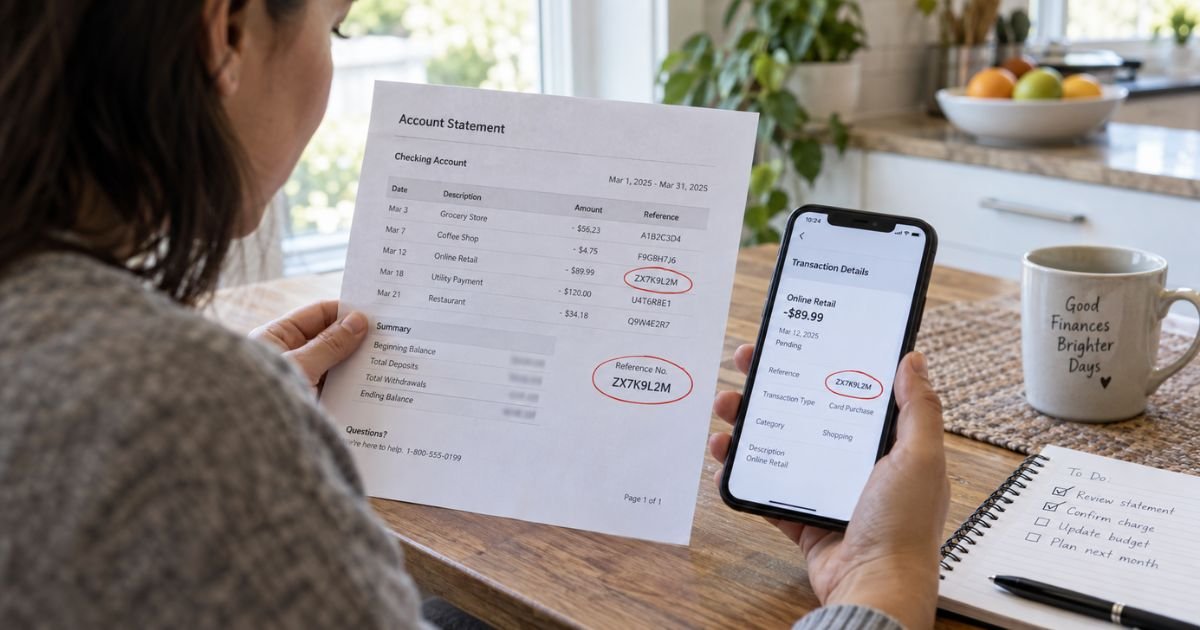
A charge ID on a bank statement can feel confusing if you don’t recall signing up for anything. That code is usually not a store name. It is typically a tracking label your bank uses to find one payment.
Unfamiliar labels like this are often legitimate. This guide explains what a charge ID is and how you can use it to match or dispute a charge.
Table of Contents
What Is a Charge ID on a Bank Statement?
A charge ID on a bank statement is generally a unique code tied to one transaction. Banks, card networks, and processors use it to locate that payment in their records.
You may see it called a transaction ID, reference number, authorization code, or confirmation number. The exact heading depends on your bank’s app or paper statement.
It is not typically the company you bought from. Think of it as a tracking number for money. The merchant name, also called the statement descriptor, is the short text meant to show who billed you. The charge ID sits beside that text so staff can pull the same sale later.
Formats vary. You may see a short number, a mix of letters and numbers, or extra digits after an asterisk. Some IDs appear only after you tap the transaction in your app. Others print on the monthly PDF. Issuers do not all show the same fields.
How a Charge ID Differs From the Merchant Name
The merchant name is the billing descriptor. Card networks generally limit that text to about 22 characters. That is why store names get shortened, and why a prefix like SQ* or PAYPAL* may appear first.
A charge ID is a separate identifier. It helps the bank find the sale even when the name is cut off.
| What you see | What it usually tells you |
|---|---|
| Merchant name / descriptor | Who billed you, often shortened |
| City, state, or phone digits | Where the merchant registered billing |
| Charge ID / reference number | Which exact payment to look up |
| Authorization or approval code | That your issuer approved the sale |
| Amount and date | What posted and when |
A store receipt may list an order number that does not match the bank’s charge ID. That is normal. Each party in the payment chain often keeps its own number. Give the agent the number that appears on your statement first.
Common Charge ID Labels You May See
Banks do not use one standard heading. Scan the transaction details, not only the main line.
| Label you may see | Typical meaning |
|---|---|
| Charge ID or Transaction ID | Bank or processor tracking code for that sale |
| Reference number | Lookup code for customer service or disputes |
| Authorization / approval code | Short code showing the issuer approved the charge |
| ARN or acquirer reference | Network trace number used after a sale settles |
| CO ID or Company ID | ACH originator ID on many bank-account payments |
| Order ID after an asterisk | Merchant or marketplace order fragment |
An authorization code is usually short. It often appears on a receipt and in the app. An ARN is a longer network trace used after a card sale settles. You typically will not see the full ARN on the statement line. Your issuer can often look it up if a refund is missing.
ACH bank payments use different tags. On some statements you may see DES, INDN, or CO ID next to a company name. Those fields come from the ACH record. Your bank can explain them.
How to Use a Charge ID to Identify a Payment
Start with the full statement line, not the ID alone. Copy the merchant text exactly as it appears. Note the date, amount, and last four digits of the card.
Then open the transaction in your bank or card app. Many apps add a category, map pin, or phone number that the printed statement omits.
Next, match those details to a receipt or email. Search your inbox for the amount and the date. Check household members and authorized users. Recurring apps often bill under a parent name plus a random suffix.
If you contact the merchant, give the date, amount, and any order number from your email first. Offer the bank’s charge ID if the agent asks.
If you contact your issuer, read the charge ID from the statement. That is the number the bank can search.
Pro Tip: Screenshot the transaction detail page before you call. Include the charge ID, descriptor, posted date, and amount.
Keep the ID out of public posts. You can share it with your bank or the merchant that billed you.
When the Charge ID Does Not Name the Merchant
A charge ID will not usually reveal the brand on its own. The descriptor does that job, and even that text can be unclear. Processors, parent companies, and marketplace sellers often appear instead of the storefront you remember.
Pending authorizations add another wrinkle. Gas stations, hotels, and some subscriptions place a temporary hold first. The hold may show one ID.
The posted sale may later show another. That does not automatically mean two purchases. The first line often drops when the final amount settles.
The ID still points to one payment. It does not prove the charge is fraud, and it does not prove it is valid. You still need the date, amount, and your own records.
What to Do If You Still Do Not Recognize the Charge
Work the merchant first when the name looks familiar. Ask for a receipt match. Request a refund if the sale is a duplicate or a canceled order. Keep the chat transcript.
If the charge looks unauthorized, contact your issuer promptly. On a credit card, the CFPB says you should also send a written billing-error notice within 60 calendar days after the statement that first showed the charge.
Include your name, address, account number, and a clear explanation of what is wrong. Send it to the billing-inquiries address on the statement, not the payment address.
After the issuer gets that notice, it generally has 30 days to confirm receipt unless it already finished the required steps. It then generally has two billing cycles, and no more than 90 days, to resolve the issue.
Pay the rest of the bill that you do not dispute. Federal billing-error rules generally let you withhold the disputed amount during the review. Confirm that with your issuer.
Debit-card and ACH problems use different federal clocks under Regulation E. Report those quickly, especially if the card is missing.
Common Mistakes: Treating the charge ID as the store name. Disputing a pending hold that is still an authorization. Calling the payment address instead of the billing-error address. Waiting past the 60-day written-notice window on a credit card.
Closing the card does not cancel a merchant’s stored credential. If the charge is a subscription you no longer want, cancel with the merchant as well.
FAQs: Charge ID on Bank Statement
Q. Is a charge ID on a bank statement a company that billed me?
A. Usually no. A charge ID is typically a tracking code for one payment. The merchant name or descriptor is the short text that identifies who charged you. Use both fields when you call your bank.
Q. Can I look up a charge ID online and see the store?
A. Not reliably. Public search tools may match a descriptor, but they generally cannot decode your bank’s private reference number. Search the merchant text instead. Then match the date and amount to a receipt.
Q. Should I give the charge ID to the merchant or only to my bank?
A. Give your bank the charge ID from your statement. That is the number it can search. Give the merchant the order number from your email or receipt first. Share the bank ID only if the merchant asks and you recognize the business.
Q. Does a missing or changing charge ID mean the payment is fraud?
A. Not by itself. Pending holds, refunds, and settled sales can show different references. Compare the descriptor, date, and amount with your records. If you still do not recognize the charge, contact your issuer and follow the written dispute steps for your account type.
Conclusion
A charge ID on a bank statement is a filing number, not a storefront. Use it with the merchant descriptor, date, and amount to match a receipt or to help an agent find the sale. If the payment is still a mystery, contact the merchant you recognize or your issuer.
On a credit card, a written billing-error notice within 60 days protects your strongest federal rights. Keep copies of every ID you share so the next call starts with the same transaction.
Disclaimer: This article is for general information only. It is not financial, legal, or tax advice. Dispute windows, statement labels, and refund rules vary by bank, card network, and account type. Confirm details for your charge with the merchant and with the issuer or bank that issued your statement.
Meet the Author
