
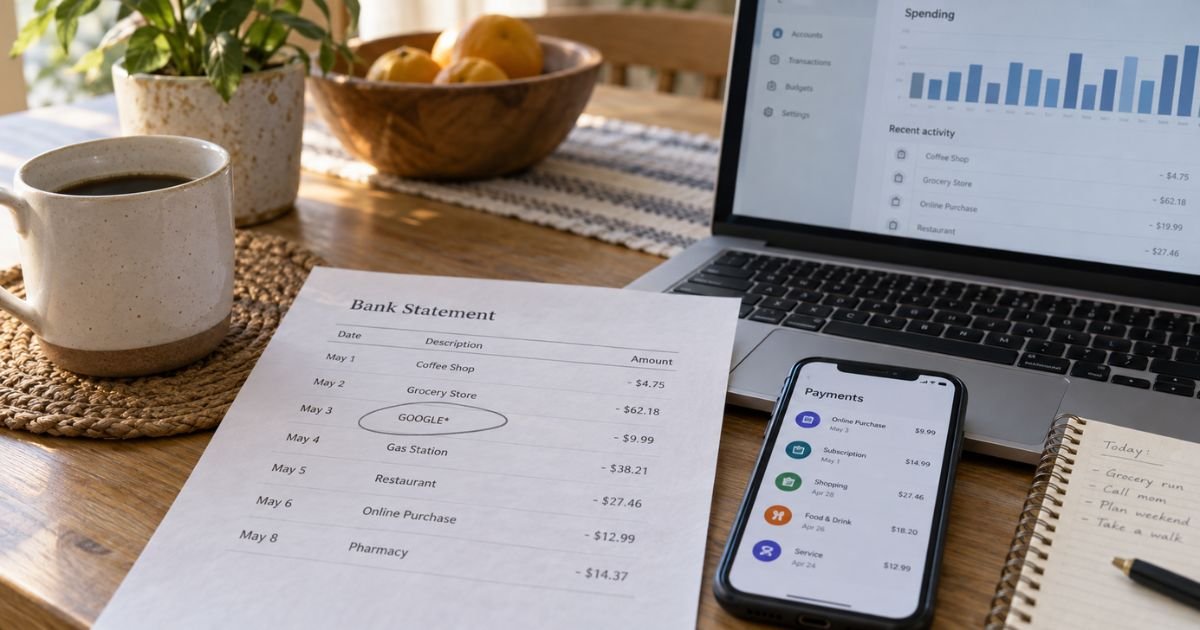
Seeing Google charges on a bank statement can feel confusing if you don’t recall signing up for anything. The line often says GOOGLE* plus a short product or app name. In many cases it is a real Play purchase, YouTube plan, storage plan, or card check, not a random store.
This guide explains how those labels usually map to Google products, where to look them up, and how to cancel or dispute one.
Table of Contents
What Google charges on a bank statement are
Google charges on bank statement are payments billed through a Google product or Google’s payment system. Official Google help says purchases from Google typically start with GOOGLE* and then name the product or another descriptor. Banks may shorten the rest of the line.
That prefix is the first clue. Google also says Google Play purchases generally print as GOOGLE* plus an app developer, an app name, or a content type such as Books. If the charge does not follow those Google formats, Google’s Play help says it did not come from Google Play. In that case, call your bank.
Google is the merchant of record for many digital items even when the brand you remember is a game studio or a YouTube channel. The studio name after GOOGLE* is often the real product.
How Google charges usually appear
Issuers cut words to fit. You may see GOOGLE*, GOOGLE *PLAY, G.CO/HELPPAY, or a Mountain View or Hamilton Avenue style location. G.CO/HELPPAY is a Google help short link some statements add. It is not a separate company.
Official Google pages map common labels like this:
- GOOGLE *GOOGLE or a YouTube-style label: often YouTube Premium
- GOOGLE* Google Storage: often Google One or Drive storage
- GOOGLE *Play, GOOGLE *{app}, or GOOGLE *{developer}: Play Store apps and in-app buys
- GOOGLE *YouTube Videos: YouTube movie or video purchases
- GOOGLE *SERVICES: can be Fiber or YouTube TV on Google’s table
- GOOGLE *Devices or GOOGLE STORE: Google Store hardware
- GOOGLE *Ads, GOOGLE *ADWS, or GOOGLE *SVCS plus a number: Google Ads
- GOOGLE *WALLET or GOOGLE *GPAY TEMP: Wallet or Pay card checks
- GOOGLE *TEMPORARY HOLD, GOOGLE *CHROME TEMP, or GOOGLE *ANDROID TEMP: card verification or Autofill checks
A temporary hold is not the same as a finished purchase. Google says GOOGLE *TEMPORARY HOLD is a pending check to confirm the card is valid. The hold should drop when the real transaction goes through, or if the check ends.
Google Ads lines may include a 10-digit customer ID. Official Ads help lists forms such as GOOGLE *ADS, GOOGLE *SVCS, or GOOGLE *ADWS plus that ID. More than one ID can mean more than one Ads account on the same card.
Where to look up the charge
Do not start with a web search of the dollar amount alone. Sign in and match the date.
- Go to payments.google.com and open Activity. Official Google One help says you can list charges and subscriptions there.
- Open Subscriptions & services on the same site for recurring plans.
- On an Android phone, open Play Store, tap your profile, then Payments & subscriptions.
- For YouTube, check youtube.com/paid_memberships or youtube.com/purchases.
- For Ads, open the Ads billing summary and match the customer ID on the statement.
- Check every Google account that might have the card saved, not only the one you use for Gmail day to day.
Family members, kids’ devices, and old phones can bill the same card. Google’s unauthorized-charge page lists family and friends as a common mix-up. Canceled orders can also leave a pending line that later drops.
Receipts usually come from a google.com or youtube.com address. Search your inbox for the same date and amount.
Pro Tip: If Activity is empty, you are probably in the wrong Google account. Switch accounts at the top of payments.google.com and check again before you call it fraud.
How to cancel a Google subscription
Cancel inside the product that billed you. Uninstalling an app does not cancel a Play subscription. Google Play help states that clearly.
For Play-billed plans, including many Android YouTube plans:
- Open Play Store on Android, or play.google.com/store/account/subscriptions on the web.
- Sign in to the account that owns the plan.
- Select the subscription and tap Cancel subscription.
- Save the confirmation.
Play subscriptions generally run until the end of the period you already paid. Google’s help example is that canceling mid-year still leaves access until the paid year ends.
YouTube Premium or Music Premium signed up on iPhone is often billed by Apple, not Google. Cancel that one in Apple subscriptions. YouTube help also points Android Play-billed members back to Google Play.
Google One can be canceled in the Google One settings or, if you bought it through Play, in Play subscriptions. Storage plan refund rules vary by how and where you bought the plan. Check the official Google One cancel page for your device. Do not assume a prorated refund.
Google Ads is not a consumer streaming plan. Pause or close campaigns and update the payment method inside Ads billing. An outstanding Ads balance can still post after you think you “turned ads off.”
What to do if you do not recognize the charge
Work in this order.
If the line is a small pending TEMPORARY HOLD, wait a few business days and see if it drops. That pattern is the official card check.
If it matches a Play app or in-app item you or a family member bought, use Google Play’s refund request when the purchase was accidental. Google’s Play help notes you may be able to request a refund for a family or friend purchase.
If the charge is on a Google account you own and looks unauthorized, use Google’s unauthorized-purchase tools. Play help says to report an unauthorized Play transaction within 120 days. Keep the claim ID from the email.
If the charge is not on any Google account you control, Google’s Play help says to contact your payment method’s fraud department right away. Lock the card. Then send your issuer a written billing-error notice so it arrives within 60 days after the first statement that showed the charge.
Changing your Google password and turning on 2-Step Verification helps after a real account takeover. Also turn on purchase authentication in Play so a PIN or fingerprint is required for buys.
Common Mistakes: Disputing a TEMPORARY HOLD that is still pending. Checking only one Gmail account while a second account holds YouTube. Uninstalling an app and thinking the subscription stopped. Calling the bank before matching payments.google.com, then losing the 60-day statement window anyway.
FAQs: Google Charges on Bank Statement
Q. Are Google charges on a bank statement a scam?
A. Usually no. Official Google help says real Google purchases typically start with GOOGLE*. A hold that says TEMPORARY HOLD is generally a card check. Treat it as suspicious if the words do not match Google’s formats, the amount does not appear in any account you own, or someone is asking you to share a code.
Q. What is GOOGLE *TEMPORARY HOLD on my statement?
A. Google says it is a pending check to confirm your card is valid when you pay through a Google service or use Autofill. It should disappear when the real purchase finishes, or if the check ends. Watch the account for several days. A posted charge of the same size is a different issue.
Q. How do I stop Google charges on a bank statement?
A. Cancel the plan in Play, YouTube, Google One, Ads, or the Store page that owns it. Remove the card from payments.google.com if you do not want it saved. Uninstalling an app is not enough. Save the cancel confirmation and watch one more cycle.
Q. Can I dispute Google charges with my bank?
A. Yes, if the charge is unauthorized or never matches a Google account you control. Try Google’s lookup and refund tools first when the purchase sits on your account. For a credit card, still send a written billing-error notice within 60 days of the statement that showed the charge if you need the federal timeline.
Conclusion
Google charges on a bank statement usually start with GOOGLE* and point to Play, YouTube, storage, Ads, Wallet, or a short card hold. Match the date and amount at payments.google.com and in every Google account tied to the card.
Cancel inside Play or the product that billed you. Use Google’s unauthorized-purchase form when the buy is on your account and was not yours. Use your bank when the line does not appear in any account you own.
Disclaimer: This article is for general information only. It is not financial or legal advice. Google descriptors, refund windows, and cancel paths vary by product and by how you signed up. Confirm account-specific questions in your Google payments activity, official Google help, or with your bank.
Meet the Author
