
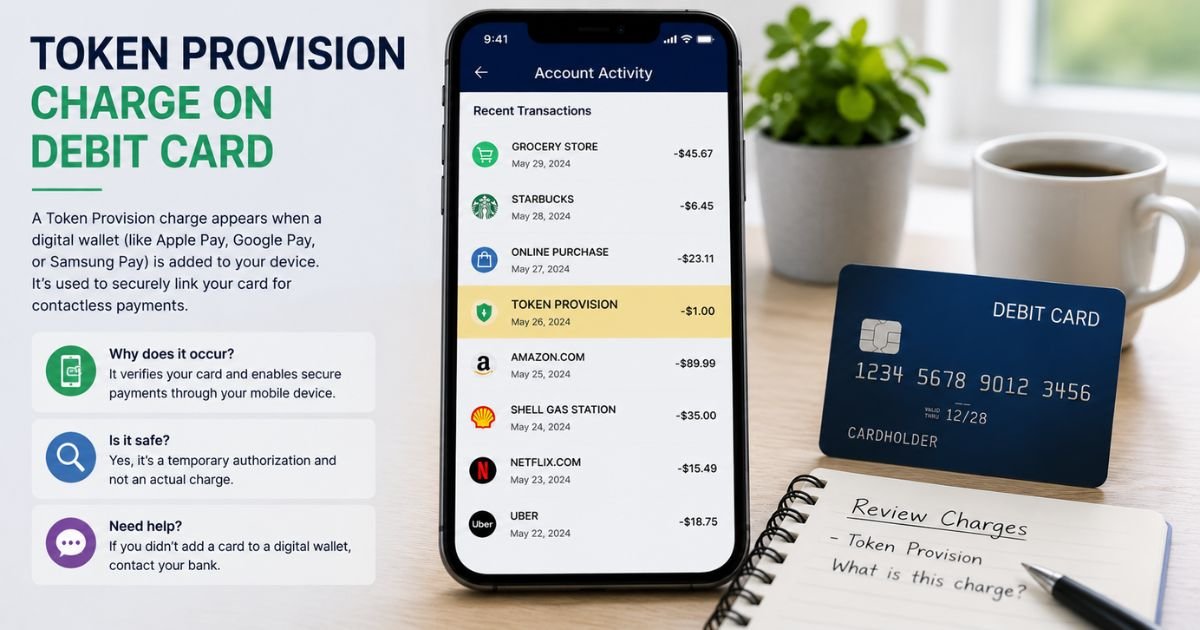
Seeing a Token Provision charge on debit card can feel confusing if you don’t recall signing up for anything new. Unfamiliar charges are often legitimate.
This guide explains what the charge means, why it shows up, and the exact steps to check or stop it.
Table of Contents
What Is the Token Provision Charge?
A Token Provision charge (sometimes listed as Visa Provisioning Service, AUTHORIZATION VISA PROVISIONING SERVIC, or Token Provision St Louis MO) is almost always a temporary $0 or $0.01 authorization.
It happens when a payment network or merchant creates a secure digital “token” for your card.
A token is a unique code that replaces your real card number. It lets apps or merchants process payments without storing your full card details.
This process is called tokenization or token provisioning.
Common descriptor variants include:
- Token Provision St Louis MO
- Visa Provisioning Service
- AUTHORIZATION VISA PROVISIONING SERVIC
- POS PUR AUTHORIZATION VISA PROVISIONING SERVIC
- CHECKCARD AUTHORIZATION VISA PROVISIONING SERVIC
Typical amount: $0.00 (or a one-cent test hold that never settles). It is not a fee that reduces your available balance permanently. The hold usually drops off in a few days.
Why Did This Charge Appear?
These authorizations occur for security reasons during digital setup. Payment networks use them to confirm your card is valid and active before issuing a token.
Common reasons include:
- You added your debit card to Apple Pay, Google Pay, Samsung Pay, or another digital wallet.
- An online merchant or subscription service tokenized your card for card-on-file storage.
- A service like PayPal, Venmo, or a retailer verified your card during enrollment.
- Your bank or network refreshed an existing token after a card update or reissue.
The “St Louis MO” location often appears because of processing centers linked to Visa’s systems. It does not mean a local merchant charged you.
How to Verify the Charge
Follow this quick checklist:
- Open your bank or debit card app and look at the pending or recent transactions.
- Note the exact descriptor, amount (usually $0), and date.
- Think about recent activity: Did you add the card to a phone wallet or save it on a website in the last few days?
- Check the wallet apps on your phone (Wallet on iPhone, Google Wallet, etc.) for newly added cards.
- Log into any subscription or shopping accounts you use and review saved payment methods.
- If nothing matches, contact your bank’s fraud or support line right away and ask them to confirm the origin.
Most of these $0 authorizations clear on their own within 1–7 days.
Is the Charge Legitimate or Fraud?
In most cases the charge is legitimate and protective. Tokenization reduces fraud risk by keeping your real card number off merchant systems.
Common legitimate explanations
- Recent digital wallet enrollment
- Card saved for future purchases on a trusted site
- Network verification after you received a new debit card
Warning signs
- You did not add the card to any wallet or online account
- The amount is more than $0 or $0.01 and actually posts
- Multiple unknown provisioning attempts appear
- You receive texts or emails about wallet additions you never requested
When to contact the bank: Call immediately if you see any of the warning signs. Ask them to block further token requests and monitor the account.
How to Cancel Token Provision / Remove the Token
You generally cannot “cancel” a $0 authorization itself because no money moves. You can remove the underlying token so it cannot be used later.
- Open the digital wallet app where the card was added.
- Select the card and choose Remove or Delete.
- For online merchants, log into the account, go to payment methods, and delete the saved card.
- Contact your bank and ask them to deprovision or suspend any active tokens linked to the card.
- If needed, request a new debit card number so old tokens become useless.
Some banks also let you manage tokens through their mobile app or online banking under security or card controls.
Can You Get a Refund?
There is normally nothing to refund. The charge is a $0 verification hold that never posts as a real debit.
If a larger amount somehow posts and you did not authorize the underlying activity, dispute it with your bank under Regulation E (for debit cards).
Banks typically investigate and reverse unauthorized transactions. Policies vary by issuer, so confirm the exact process with yours.
What to Do If the Charge Is Unauthorized
- Contact your bank or credit union right away through the number on the back of your card or in the app.
- Report the token provision attempt as potentially unauthorized.
- Ask them to freeze the card or block new token requests.
- Request a replacement debit card with a new number.
- Monitor your account for any follow-up activity.
- Consider placing a fraud alert if other suspicious signs appear.
Act quickly. Debit card protections under federal rules are strong when you report promptly.
Prevention Tips
- Only add your debit card to wallets and sites you trust.
- Use a credit card instead of debit for online enrollments when possible.
- Turn on transaction alerts in your banking app.
- Regularly review saved payment methods in apps and websites.
- Enable any “card controls” or token management features your bank offers.
- Avoid public Wi-Fi when adding cards to digital wallets.
FAQs: Token Provision Charge on Debit Card
Q. Why does Token Provision show as St Louis MO?
A. The location often ties to Visa’s processing systems. It does not mean a St. Louis business charged you. The charge is still part of the standard token verification process.
Q. Will the Token Provision charge take money from my account?
A. Typically no. It appears as a $0 or $0.01 pending authorization and drops off without affecting your balance. Contact your bank if any amount actually posts.
Q. Is Token Provision the same as a gas station or hotel hold?
A. No. Gas and hotel holds reserve a larger dollar amount for an unknown final total. Token Provision is a zero-dollar card-validation step used only for creating a secure payment token.
Q. What should I do if I never added my card to anything?
A. Treat it as possible unauthorized activity. Call your bank, report it, remove any unknown devices or tokens, and request a new card if recommended.
Conclusion
A Token Provision charge on debit card is usually a harmless $0 verification that happens when a secure digital token is created for a wallet or online payment method. It protects your real card number. Most people see it after adding a card to Apple Pay, Google Pay, or a trusted merchant.
Check recent activity first. If everything matches, you can safely ignore the pending $0 entry. If nothing matches, contact your bank right away to protect the account. Understanding the charge helps you stay in control of your debit card activity.
Disclaimer: This article is for informational purposes only and is not financial or legal advice. Billing descriptors, hold times, and refund rules can vary by bank and card network. Always verify details with your financial institution or the company involved for your specific situation.
Meet the Author
