
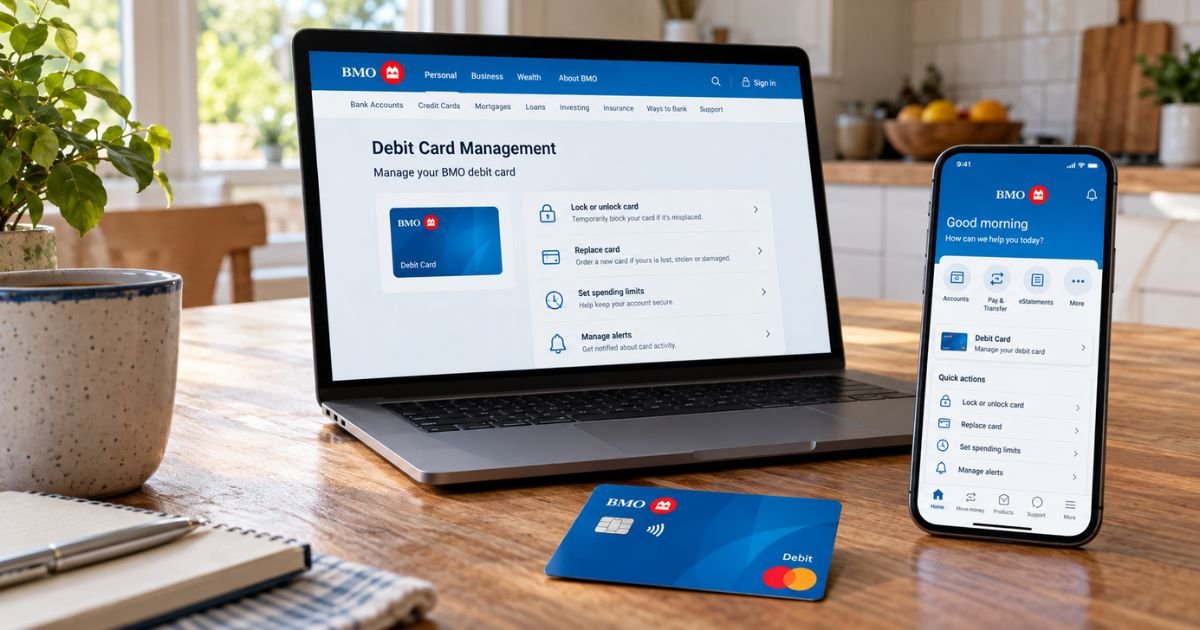
A new BMO debit card can feel confusing if you bank at bmo.com and the plastic still will not swipe. Activation is a normal first step. This guide follows BMO’s official U.S. help, with a short note if your card is from BMO Canada instead.
Table of Contents
What Activating a BMO.com Debit Card Means
Activating a BMO.com debit card tells BMO Bank N.A. that you received the card tied to your U.S. checking account. Official U.S. debit pages say you can turn it on in online banking, by phone, or, for a replacement, by using your existing PIN.
BMO in the United States and BMO in Canada are different sites and apps. U.S. personal banking lives at bmo.com/en-us.
Canadian debit help lives on the Canada site and uses different menus. Use the country that issued your account. This article focuses on BMO U.S. steps from bmo.com.
Do not give your PIN or a one-time passcode to someone who called you first. Start from bmo.com or the number printed on your card.
Activate in BMO U.S. online banking
Official U.S. debit card pages give these steps:
- Go to bmo.com and sign in to online banking.
- Select Your Account.
- Open Manage debit/ATM cards.
- Select Activate Card.
- Follow the prompts until you see confirmation.
The BMO Debit Mastercard page repeats the same path: Your Account, Manage debit/ATM cards, Activate Debit Card.
If you use the BMO Digital Banking app, look for the same Manage debit/ATM cards tools after you sign in.
Official card-controls help also uses the app More menu, then Manage debit/ATM cards. Labels can shift after an app update.
If Activate Card is missing, wait and try the website path, or call.
Stay on bmo.com or the official BMO U.S. app. Do not type the full card number into a search-ad page that only looks like BMO.
Activate by phone
Official U.S. pages list more than one number.
- The main debit cards page says call 1-888-340-2265 to activate.
- The BMO Debit Mastercard page says you can also call 1-877-547-7994 to activate.
Use the number on your card sticker or the back of the card when it is printed there. Have the 16-digit number and the phone number BMO has on file.
1-888-340-2265 is also the official U.S. number those pages give to request a mailed card, report a lost card, link a savings account, or ask for PIN help.
Call only numbers you typed from bmo.com or from the card. Hang up if a caller asks you to read a text code so they can “unlock” a card you did not request.
Activate a replacement card with your PIN
Official Debit Mastercard help says a replacement debit card can also be activated by making a transaction with your existing PIN at any ATM or in a store.
That path is for a replacement when you already have a PIN. A first card for a brand-new account may still need the online or phone step. Follow the letter that came with your card.
If you choose an ATM, a BMO ATM is the safer first try. Official U.S. pages also mention large Allpoint fee-free networks. Other banks’ machines may not complete BMO’s activation the same way.
After a successful PIN transaction, try a small purchase or a balance check so you know the card is live.
Pro Tip: Activate in Your Account before you stand in a checkout line. Then run one tiny PIN sale or ATM inquiry so you are not stuck with a cart and a decline.
Change your PIN and lock the card
Official Debit Mastercard FAQs say you can change or request a PIN this way:
- Sign in at bmo.com.
- Go to Your Account, then Manage debit/ATM cards.
- Select Change PIN.
You can also request a new PIN at a BMO branch or by calling 1-888-340-2265. If you already know the PIN, official help says you can change it at any BMO ATM.
Locking is separate from first-time activation. Official U.S. help says you can lock the card, report it lost or stolen, and request a replacement in BMO Digital Banking. You can also call 1-888-340-2265. Review the account for charges you do not recognize.
BMO’s U.S. debit monitor page also describes turning the card on and off in the app and setting alerts. Recurring payments may still run under some control settings. Read the in-app notes before you travel.
Add an activated card to Apple Pay, Google Pay, or Samsung Pay from your phone wallet if your card is eligible. Official U.S. debit pages list those wallets.
If the card never arrives
Official U.S. debit help says existing customers can visit a branch for a card on the spot or call 1-888-340-2265 for a card by mail. Branch hours and instant-issue rules can vary. Call ahead if you need plastic the same day.
Canadian official help is different. BMO Canada pages have said a new debit card after a lost-or-stolen report arrives in 6 to 8 business days. Do not use Canada timing for a U.S. bmo.com account.
If the envelope looks opened, treat it as possible mail theft. Call 1-888-340-2265 from a number you typed yourself. Ask BMO to cancel that card and send another.
Report unauthorized debit use quickly. Federal Regulation E generally gives stronger consumer protection when you notify the bank soon after you learn of a problem.
Official U.S. debit pages also describe zero liability for unauthorized purchases when you qualify under the bank’s terms. Report first. Then review ATM, store, and online debit lines.
If you have a BMO Canada card
Canadian debit cards use BMO Online Banking or the Canada mobile app. Official Canada pages point to Manage Card on the account, not the exact U.S. “Activate Card” label. Canada PIN changes may need a later ATM transaction to finish.
If your statement, branch, or app is clearly Canadian, use the Canada site’s debit help instead of the U.S. phones above.
If activation fails
Check these first:
- You signed into the U.S. profile that owns that checking account.
- You chose Manage debit/ATM cards, not a credit card menu.
- The card is not locked in Digital Banking.
- You are using the newest card, not an old replacement.
- A joint owner did not already activate or lock it.
For a purchase problem after the card works, official help says contact the merchant first, then call 1-888-340-2265 if you still need BMO.
Shred the old card through the chip and number after the new one works. Remove the old last four digits from any digital wallet.
Common Mistakes: Using a BMO Canada activation page for a U.S. bmo.com account. Also, guessing a PIN at an ATM until the card blocks. Use Change PIN online or call 1-888-340-2265 instead.
FAQs: How to Activate a BMO.com Debit Card
Q. How do I activate a BMO debit card on bmo.com?
A. Official U.S. help says sign in at bmo.com, open Your Account, choose Manage debit/ATM cards, then Activate Card. You can also call 1-888-340-2265 or, on the Debit Mastercard page, 1-877-547-7994.
Q. Can I activate a BMO replacement card at an ATM?
A. Official Debit Mastercard help says a replacement can be activated by a transaction with your existing PIN at any ATM or in a store. A first card may still need online or phone activation. Follow the mailer for your card.
Q. How do I change my BMO debit PIN?
A. Official U.S. help says use Your Account, Manage debit/ATM cards, Change PIN. You can also change a known PIN at a BMO ATM, or request a new PIN at a branch or by calling 1-888-340-2265.
Q. What if my BMO debit card is lost?
A. Official U.S. help says lock it, report it lost or stolen, and order a replacement in BMO Digital Banking, or call 1-888-340-2265. Review the account for charges you do not know.
Conclusion
Activating a BMO.com debit card is an official U.S. step in Your Account under Manage debit/ATM cards, or by calling 1-888-340-2265 or 1-877-547-7994.
Replacements may turn on with your current PIN at an ATM or store. Use BMO Canada help only if that is the bank that issued your account.
Disclaimer: This article is for general information only. It is not financial or legal advice. BMO U.S. and BMO Canada use different apps, phones, and timelines. Confirm activation and PIN rules with BMO using bmo.com or the number on your card.
Meet the Author
