
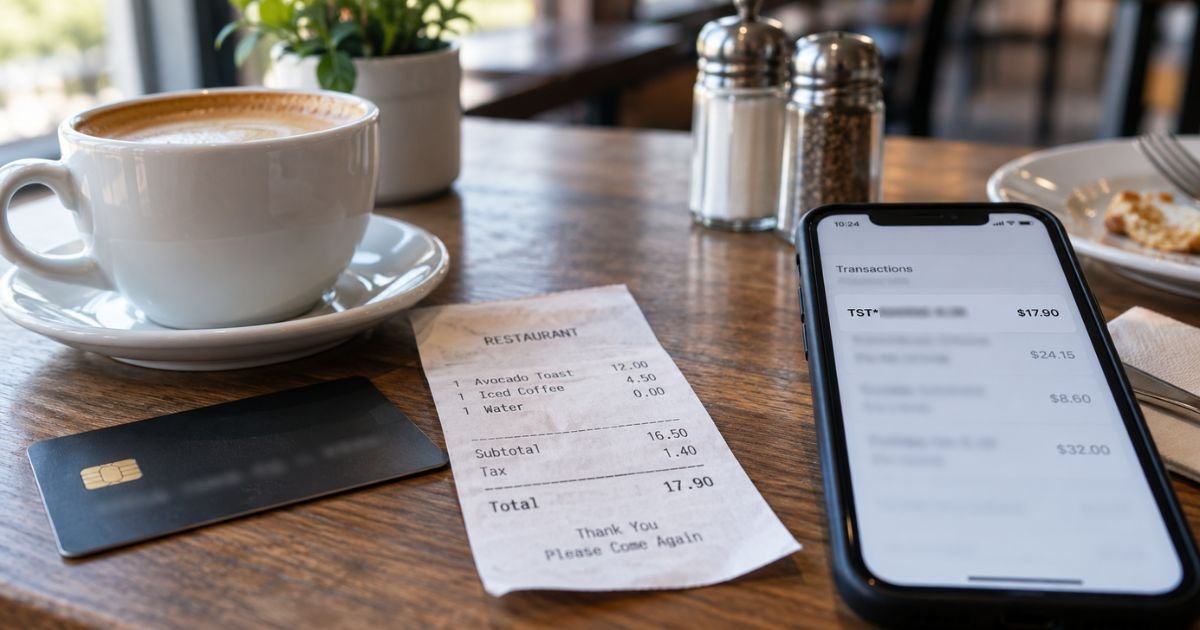
A TST charge on credit card can feel confusing if you don’t recall signing up for anything. In most cases it is a normal restaurant or cafe payment, not a mystery subscription.
This guide explains what TST usually means, how to match it to a real visit, and what to do if the amount still looks wrong.
Table of Contents
What Is a TST Charge on Credit Card?
A TST charge on credit card is typically a purchase processed through Toast, a restaurant point-of-sale and payments platform.
Toast’s official help pages list TST*Restaurant Name as the descriptor for a purchase at a Toast restaurant. The letters TST are a short label for Toast. The name after the star is usually the place you paid.
You are generally not buying a Toast product for yourself. Toast runs the register, online order page, or handheld card reader for the business.
The dollar amount on your statement is usually the restaurant’s charge, including tax and any tip you added.
Toast, Inc. is a publicly traded US company based in Boston. It sells POS software, hardware, and payment processing to restaurants, bars, cafes, food trucks, and some retail food businesses.
Company filings have put live locations well above 100,000 in recent years, which is why TST* shows up on so many statements.
| What you may see | What it typically means |
|---|---|
| TST* plus a restaurant name | Card payment at that Toast location |
| TST* plus a short or cut-off name | Same thing, with the name truncated |
| TOAST TAB | Less common Toast-related wording |
| ACH TOAST, INC | Usually a restaurant’s own Toast billing, not a diner’s card charge |
A few older explainers guess that TST means “test transaction” or “transaction settlement.” That is not the usual reading when you see TST* plus a business name.
Official Toast documentation treats TST* as a restaurant purchase label.
How a TST Charge Usually Appears
You will rarely see the letters TST sitting alone. Issuers and processors typically print a prefix, then part of the merchant name.
Card networks also limit how many characters fit on a statement line. That is why the restaurant name often looks chopped off.
Common patterns include:
TST*HARBOR GRILLTST*MAIN ST PIZZATST*COFFEEHOUSETST* LOCAL NAMEwith extra spaces or city text- A pending line that later posts with a slightly different total
Your bank app may also add words like POS, CHECKCARD, or PURCHASE in front. Those extra words come from your issuer. They do not change who processed the payment.
Some statements later drop the TST* prefix and show only the restaurant name. Other cards keep TST* on the posted line. Both versions can be the same visit.
Why the Name Looks So Short
Statement descriptors are short by design. Toast’s prefix uses several characters. The restaurant name has to squeeze into what is left. A long cafe name can become a few clipped words that you do not recognize at first glance.
The same restaurant can also look different from card to card. One issuer may show more of the name. Another may hide the city. A third may recategorize the purchase after it posts. None of that by itself means the charge is fake.
Pro Tip: Search the words after TST* plus your city and the word restaurant. A map listing or menu page often confirms the place faster than calling the bank first.
Common Reasons You See This Charge
Most TST lines trace back to a recent food or drink purchase. Typical sources include:
- Dine-in at a restaurant, bar, or cafe that uses Toast
- Takeout or curbside pickup paid at the counter
- An online order placed on the restaurant’s Toast ordering page
- A tip added after you signed or tapped
- A catering invoice or event deposit paid through Toast
- A gift card bought on a restaurant site that runs Toast checkout
The charge is usually one-time. Toast is not typically billing you for a monthly consumer membership under the TST* label.
If the same restaurant name repeats every month, look at that restaurant’s own club, meal plan, or stored card on file.
Delivery apps are a separate story. DoorDash, Uber Eats, and similar apps generally post under their own names.
A TST* line more often means you paid the restaurant directly, either in person or on the restaurant’s own order page.
How to Match the Charge to a Real Visit
Start with the date and the amount, not the awkward letters.
- Compare the date with meals, coffee runs, or takeout from that week.
- Add the tip. The posted total is often higher than the food subtotal you remember.
- Check email and texts for a digital receipt. Many Toast terminals offer an emailed or texted receipt if you shared contact details.
- Ask anyone else who uses the card. A partner, teen, or coworker may have grabbed lunch.
- Search the clipped name online. Include nearby neighborhoods if you traveled.
If you still cannot place it, call the restaurant whose name appears after TST*. Give the date and amount. The manager can usually pull the ticket.
Toast’s public site is built for restaurants, so the dining business is generally the first stop for a guest receipt question.
Pending authorizations can also confuse you. A restaurant may hold an estimated amount, then post the final total after the tip.
The pending line can drop or change within a few business days. Wait for the posted figure before you treat a small difference as a second charge.
What If the Amount Looks Too High
A TST charge that looks “too big” is often still the same check. Common reasons include:
- Tip added on the printed slip or on the handheld screen
- Automatic gratuity on a large party
- Sales tax you did not add in your head
- A credit card surcharge at restaurants that legally add one
- An extra drink, dessert, or takeout bag you forgot
- Two tickets combined when the table split cards poorly
Toast also offers restaurants a credit card surcharging tool. Where state and card-network rules allow it, the posted amount may be a bit higher than a cash total. Ask the restaurant for the itemized ticket if the math still feels off.
Do not assume Toast itself added a separate consumer “processing fee” on top of your meal. Toast’s processing cost is generally a merchant expense. What you see on the card is typically the amount the restaurant ran.
Is a TST Charge a Subscription?
Usually no. A classic TST* line is a restaurant sale. It is closer to a Square SQ* coffee charge than to Netflix.
Still scan for repeats. Some restaurants store a card for a loyalty tab, private dining deposit, kids-eat plan, or online ordering profile.
If TST* plus the same name posts on a set schedule, log into that restaurant’s account or app and look for a saved card. Cancel there if you no longer want the charges.
A different Toast label, such as ACH activity in the name Toast, Inc., is more typical on a restaurant’s business bank account.
That is Toast billing the merchant for software or processing. It is not the usual diner-facing TST* card charge.
How to Get a Refund or Dispute
If the visit was real but the ticket is wrong, contact the restaurant first. Refunds for overcharges, wrong items, or a canceled catering order generally have to start with that business.
When the restaurant issues a refund through Toast, it typically returns to the same card. Timing varies by issuer.
If you did not make the purchase and nobody in your household did, treat it as possible unauthorized use.
- Note the exact descriptor, date, and amount.
- Freeze or lock the card in your issuer’s app if the charge is clearly not yours.
- File a dispute with the card issuer. For credit cards, the Fair Credit Billing Act generally gives you 60 days after the statement was sent to give written notice of a billing error.
- Ask whether a temporary credit applies while the issuer investigates.
Issuers often acknowledge a written billing-error notice within 30 days and aim to resolve it within two billing cycles, not to exceed 90 days.
Debit cards follow a different timeline under Regulation E, so act quickly if the charge hit a checking account.
Common Mistakes: Disputing a dinner you forgot before you check the tip. Calling Toast as if it were the restaurant. Ignoring a second pending line that is only the final posted total. Waiting months to ask about a charge you never recognized.
Keep screenshots of the statement line. A clipped name is easier to explain when you can show the exact text.
FAQs: TST Charge on Credit Card
Q. What does TST stand for on my statement?
A. TST typically stands for Toast, the restaurant POS and payments platform. Official Toast help lists TST*Restaurant Name as a purchase at a Toast location. The restaurant after the star is usually who you paid.
Q. Is a TST charge on credit card a scam?
A. Not by itself. TST* is a widely used, legitimate descriptor for Toast restaurant payments. A single charge that matches a recent meal is generally normal. Repeated unknown TST* lines, odd late-night amounts, or charges from a city you have never visited deserve a closer look and a call to your issuer.
Q. Can I cancel a TST charge like a subscription?
A. Most TST charges are one-time restaurant payments, so there is nothing monthly to cancel at Toast. If the same restaurant keeps billing you, cancel the saved card or membership with that restaurant. For an unauthorized charge, dispute it with your bank or card issuer instead of hunting for a Toast “unsubscribe” page.
Q. Who do I contact if I do not recognize the restaurant name?
A. Start with the words after TST*. Search that name and call the business with the date and amount. If you cannot find any matching place and you did not eat out, contact your card issuer to review merchant details and open a dispute if needed.
Conclusion
A TST charge on credit card is usually Toast processing a restaurant, cafe, or bar payment, not a hidden consumer subscription.
Read the name after TST*, match the date and tip-inclusive total, and ask the restaurant for the ticket if the wording is clipped.
If the charge is truly not yours, use your issuer’s dispute process and do not wait on the statement cycle.
Disclaimer: This article is for general information only. It is not financial, legal, or tax advice. Merchant descriptors, tips, surcharges, refunds, and dispute rules vary by restaurant, state, card network, and issuer. Confirm account-specific questions with the business on the charge or with your bank.
Meet the Author
