
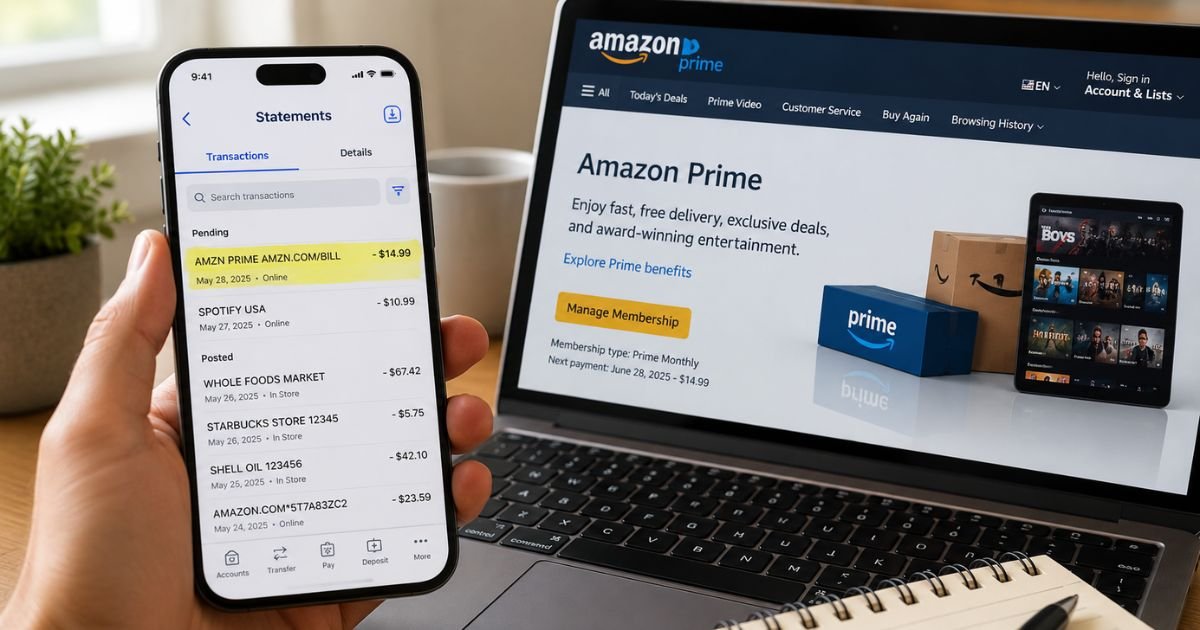
You open your bank or credit card statement and spot a charge that looks like “Amazon Prime,” “AMZN PRIME,” or something similar. It can feel confusing if you do not remember signing up or renewing.
Most of the time this charge is completely legitimate. It is simply how Amazon bills for an active Prime membership. Still, you should always double-check it.
This article shows you the exact ways an Amazon Prime charge on bank statement appears, why it shows up, how to confirm it is yours, and the clear steps to cancel or dispute it if something is wrong.
Table of Contents
What Is the Amazon Prime Charge?
Amazon Prime is Amazon’s paid membership program. It includes free shipping on eligible items, access to Prime Video, Prime Music, exclusive deals, and other benefits.
When Amazon bills you for the membership (monthly or annual), the charge appears on your bank or credit card statement under short billing descriptors.
Amazon uses these codes because banks limit the number of characters that can show.
Common ways the Amazon Prime charge looks on statements include:
- AMZ*Prime Shipping Club amzn.com/bill
- AMAZON PRIME* followed by a code and amzn.com/bill
- AMAZON PRIME
- AMZN PRIME or AMZN*PRIME
- AMAZON PRIME AMZN.COM/BILL
- AMZNPrime
You may also see slight variations depending on your bank, such as “AMAZON.COM*PRIME MEMBERSHIP” or “AMZN PRIME AMZN.COM/BILL WA.” The “WA” often points to Amazon’s Washington headquarters.
These descriptors are different from regular shopping charges (which often show as AMZN MKTP US or AMAZON.COM) or digital content purchases.
Why Did This Charge Appear?
Here are the most common reasons you see an Amazon Prime charge:
- Your free trial ended and the paid membership started.
- Your monthly or annual Prime membership renewed automatically.
- A family member or household member who shares your Amazon account or payment method signed up or renewed.
- You switched from monthly to annual billing (or the reverse).
- Tax was added, so the amount is slightly higher than the base price.
- A temporary authorization hold posted while Amazon processed the renewal.
As of 2026, the standard U.S. prices are $14.99 per month or $139 per year (plus applicable tax). Lower rates exist for eligible students or other qualified programs.
How to Verify the Charge
Use this quick checklist:
- Note the exact date, amount, and full descriptor from your bank statement.
- Sign in to your Amazon account and go to Your Transactions or Your Orders.
- Visit Manage Your Prime Membership to see your current plan, billing date, and payment method.
- Check your email for any confirmation messages from Amazon about a renewal or trial ending.
- Ask anyone who has access to your Amazon account or the payment card whether they renewed Prime.
- Compare the amount to the known Prime price plus tax for your area.
If the dates and amounts match, the charge is almost certainly your legitimate membership fee.
Is It Legitimate or Fraud?
Common legitimate scenarios
- Automatic renewal of an active membership
- End of a free trial
- A household member using a shared payment method
Warning signs
- You have never had an Amazon account or Prime membership
- The amount is far higher or lower than expected
- Multiple similar charges appear in a short time
- You already canceled and still see new charges
If anything feels off, first check your Amazon account.
Then contact Amazon customer service through the Help section or by calling the number listed on their site (commonly 1-888-280-4331 for U.S. customers).
After that, reach out to your bank if needed.
How to Cancel
Amazon makes cancellation straightforward.
- Sign in to your Amazon account.
- Go to Manage Your Prime Membership or visit the direct Cancel Membership page.
- Follow the prompts to end your membership.
- Confirm the cancellation. You will see the end date of your current benefits.
You can also start from the Customer Service homepage and select the option for help with your membership.
Canceling stops future charges. You keep Prime benefits until the end of the current paid period. Note that some add-on channels or third-party subscriptions may continue separately and need their own cancellation.
Can You Get a Refund?
Amazon’s policy allows a full refund of the current membership period if you have not used the benefits.
- Request the refund during the cancellation process when eligible.
- Amazon typically processes the refund in three to five business days.
- The refund appears as a credit back to the original payment method.
If the charge is unauthorized or you believe it is a mistake, open a case with Amazon first. If Amazon does not resolve it, file a dispute with your bank or credit card issuer.
Credit cards generally give you 60 days from the statement date. Debit cards often require faster reporting.
What to Do If the Charge Is Unauthorized
- Sign in to Amazon and review all recent activity and payment methods.
- Contact Amazon customer service right away and report the unrecognized charge.
- Change your Amazon password and enable two-step verification.
- Call your bank or card issuer the same day and request a dispute or freeze if needed.
- Monitor your accounts for any other unusual activity.
- Keep notes of every conversation, including dates and reference numbers.
Acting quickly protects your rights under U.S. consumer rules.
Prevention Tips
- Review your bank and credit card statements weekly.
- Turn on real-time purchase alerts in your banking app.
- Keep a list of all active subscriptions, including Amazon Prime.
- Use a dedicated payment method for subscriptions when possible.
- Set a calendar reminder a few days before your known renewal date.
- Regularly check Manage Your Prime Membership and Your Transactions.
- Remove unused payment methods from your Amazon account.
- Enable two-step verification on your Amazon login.
- If you share an account, agree on who handles renewals.
Common Amazon Prime Descriptor Variations
| Statement Appearance | What It Usually Means |
|---|---|
| AMZ*Prime Shipping Club amzn.com/bill | Official Prime membership charge |
| AMAZON PRIME* [code] amzn.com/bill | Prime renewal with reference code |
| AMAZON PRIME or AMZN PRIME | Standard membership billing |
| AMZNPrime or AMZN*PRIME | Shortened bank version of Prime |
| AMAZON PRIME AMZN.COM/BILL | Common full-style descriptor |
Typical Refund & Dispute Windows
| Action | Usual Time Frame |
|---|---|
| Request refund from Amazon | During cancellation if eligible |
| Amazon processes refund | 3–5 business days |
| Credit card dispute | Within 60 days of statement |
| Debit card / bank dispute | Report as soon as possible |
FAQs: What Does Amazon Prime Charge Look Like on Bank Statement
Q. Why does my Amazon Prime charge show a different amount than $14.99 or $139?
A. Sales tax is added in most states. The final amount on your statement includes tax, so it often appears a few dollars higher.
Q. Can a family member’s Prime charge appear on my card?
A. Yes. If they use a payment method saved on a shared Amazon account or Household, the charge can post to your card.
Q. How do I see the exact date Amazon will charge me next?
A. Sign in, go to Manage Your Prime Membership, and look for the next billing date listed there.
Q. What if I canceled but still see a new Amazon Prime charge?
A. Check whether the charge is for the current period that had already started. Contact Amazon customer service with the transaction details so they can review it.
Conclusion
An Amazon Prime charge on bank statement usually appears as AMZ*Prime, AMAZON PRIME, AMZN PRIME, or a similar variation ending in amzn.com/bill.
In most cases it is simply the automatic renewal of your membership.
Verify it by checking your Amazon account, confirm the amount matches the known price plus tax, and cancel anytime through the official membership page if you no longer want it.
If the charge is truly unauthorized, contact Amazon and your bank promptly.
You now have everything you need to identify, verify, and handle the charge with confidence.
Disclaimer: This article is for informational purposes only and is not financial or legal advice. Always confirm details directly with Amazon and your bank or card issuer, as policies and descriptors can change.
Meet the Author
